

Finding Status Definitions
Each Finding created in DefectDojo has a Status which communicates relevant information. Statuses help your team keep track of their progress in resolving issues.
Each Finding status has a context-specific meaning which will need to be defined by your own team. These are our suggestions, but your team’s usage may vary.
Please note that Open/Closed are not explicit Status types for Findings. Certain aspects of the Classic UI (the “All Open Findings” table, for example) may refer to Open or Closed Findings: this is meant as a catchall for
- Active and/or Verified Findings, in the case of “Open Findings”
- Inactive and/or Risk Accepted, Under Review, Out Of Scope, False Positive Findings, in the case of “Closed Findings”
Open Finding Statuses
Once a Finding is Active, it will be labeled as an Open Finding, regardless of whether or not it has been Verified.
Open Findings can be seen from the Findings > Open Findings view of DefectDojo.
Active Findings
‘This Finding has been discovered by a scanning tool.’
By default, any new Finding created in DefectDojo will be labeled as Active. Active in this case means ‘this is a new Finding that DefectDojo has not recorded on a past import’. If a Finding has been Mitigated in the past, but appears in a scan again in the future, the status of that Finding will reopen to reflect that the vulnerability has returned.
Verified Findings
‘This Finding has been confirmed by our team to exist.’
Just because a tool records a problem does not necessarily mean the Finding requires engineering attention. Therefore, new Findings are also labeled as Unverified by default.
If you’re able to confirm that the Finding does exist, you can mark it as Verified.
Certain DefectDojo functions require Findings to be Active and Verified. If you don’t need to manually verify each Finding, you can deactivate the Verified requirement for any or all of these functions from the System Settings page (Classic UI: Configuration > System Settings, Pro UI: Settings > Pro Settings > System Settings).
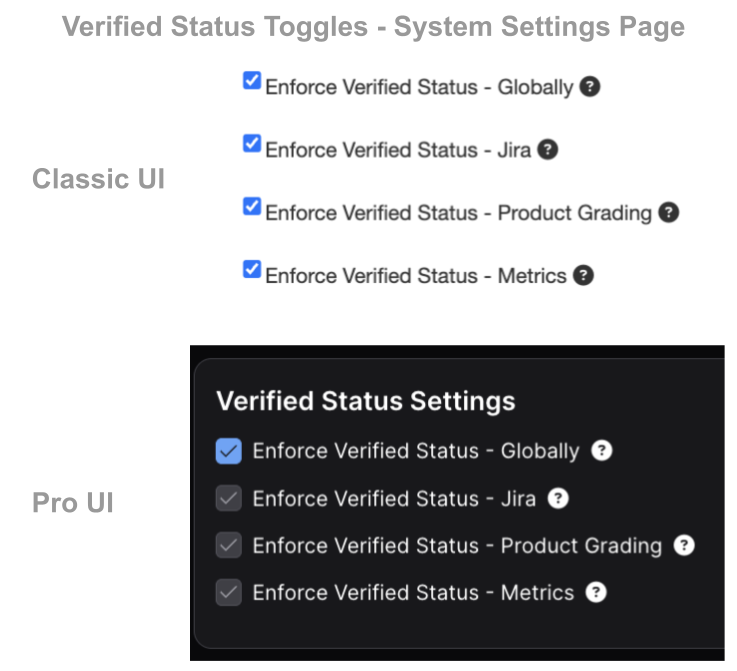
These Verified Statuses are required for
- Pushing Jira Issues
- Applying Grading to Products
- Calculating Metrics
Closed Finding Statuses
‘The Vulnerability recorded here is no longer active’.
Once the work on a Finding is complete, you can manually Close it from the Close Findings option. Alternatively, if a scan is re-imported into DefectDojo which does not contain a previously-recorded Finding, the previously-recorded Finding will automatically close.
Inactive
‘This Finding was discovered previously but it was either mediated or does not require immediate attention.’
If a Finding is marked as Inactive, this means that the issue currently has no impact on the software environment and does not need to be addressed. This status does not necessarily mean that the issue has been resolved, as active Risk Acceptances also label Findings as Inactive.
Under Review
‘I have sent this Finding to one or more team members to look at.’
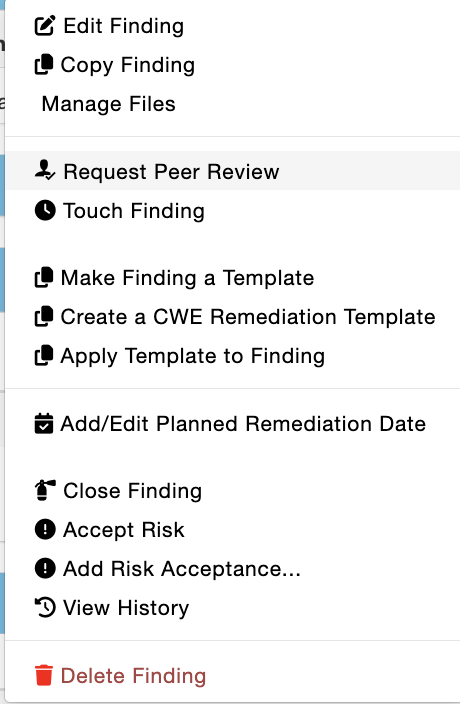
When a Finding is Under Review, it needs to be reviewed by a team member. You can put a Finding under review by Selecting Request Peer Review from the Finding’s drop-down menu.
Risk Accepted
‘Our team has evaluated the risk associated with this Finding, and we’ve agreed that we can safely delay fixing it.’
Findings cannot always be remediated or addressed for various reasons. You can add a Risk Acceptance to a Finding with the Add Risk Acceptance option. Risk Acceptances allow you to upload files and enter notes to support a Risk Acceptance decision.
Risk Acceptances have expiry dates, at which time you can reevaluate the impact of the Finding and decide what to do next.
For more information on Risk Acceptances, see our Guide.
Out Of Scope
‘This Finding was discovered by our scanning tool, but detecting this kind of vulnerability was not the direct goal of our test.’
When you mark a Finding as Out Of Scope, you are indicating that it is not directly relevant to the Engagement or Test it is contained within.
If you have a testing and remediation effort related to a specific aspect of your software, you can use this Status to indicate that this Finding is not part of your effort.
False Positive
‘This Finding was discovered by our scanning tool, but after reviewing the Finding we have discovered that this reported vulnerability does not exist.’
Once you’ve reviewed a Finding, you might discover that the vulnerability reported does not actually exist. The False Positive status will be maintained by reimport and prevent matching findings from being opened or closed, which assists with noise reduction.
If a different scanning tool finds a similar Finding, it will not be recorded as a False Positive. DefectDojo can only compare Findings within the same tool to determine if a Finding has already been recorded.
Severity vs Risk
Severity reflects the technical impact of an issue if exploited. Risk reflects the business urgency and required response, factoring in context such as exposure, exploitability, compensating controls, and operational impact.
Risk Level Definitions
Urgent
A finding that represents an immediate and unacceptable business risk.
High likelihood of exploitation or active exploitation observed Direct exposure of critical systems, sensitive data, or customer environments Limited or no compensating controls Failure to act could result in severe business disruption, regulatory impact, or reputational damage
Expected action: Immediate response Typical SLA: Emergency remediation
Needs Action
A finding that poses a clear and actionable risk requiring timely remediation or mitigation.
A realistic attack path exists The affected asset is exposed, business-critical, or customer-facing Compensating controls are weak, missing, or unverified Exploitation would result in measurable business, security, or compliance impact
Expected action: Active remediation or mitigation required Typical SLA: Short-term remediation window
Medium Risk
A finding that presents a moderate level of business risk and should be remediated in a planned timeframe.
Meaningful impact could occur if exploited Some exposure exists, but exploitation requires specific conditions or privileges May affect production systems or customer data indirectly Often aligns with medium or high severity issues without immediate exploitability
Expected action: Prioritized remediation Typical SLA: Planned remediation window
Low Risk
A finding that presents minimal business impact and does not require immediate action.
No known exploitation in the wild Limited or no exposure (e.g., internal systems, non-production, strong compensating controls) Remediation can be addressed as part of normal development or maintenance cycles Often informational or low-severity findings, but may include higher-severity issues that are well-mitigated
Expected action: Track and address opportunistically Typical SLA: Best effort / backlog