

EPSS / KEV (Pro)
DefectDojo Pro automatically enriches your Findings with two external threat-intelligence sources — EPSS and CISA KEV — so that prioritization reflects how likely a vulnerability is to be exploited, not just its CVSS severity. Both sources match to Findings by CVE, refresh on a daily schedule, and feed directly into each Finding’s computed priority score.
Enrichment data is stored once per vulnerability, then applied to every Finding that references it. That means a CVE seen on ten thousand Findings is looked up once, and you can inspect its EPSS and KEV values directly in the Vulnerability Explorer — not just Finding by Finding.
On DefectDojo Cloud, enrichment is fully managed: DefectDojo maintains the underlying threat-intelligence data and delivers it to your instance. There is nothing to install, no feed URLs to configure, and no daily job to schedule — it runs for you.
The two sources
EPSS — Exploit Prediction Scoring System
EPSS is a data-driven model published by FIRST that estimates the probability a given CVE will be exploited in the wild in the next 30 days. DefectDojo Pro stores two EPSS values on each matching Finding:
| Field | Meaning |
|---|---|
| EPSS Score | Probability of exploitation in the next 30 days, from 0.0 to 1.0 (e.g. 0.94 = 94%). |
| EPSS Percentile | Where this CVE ranks against all scored CVEs, from 0.0 to 1.0 (e.g. 0.99 = in the top 1% most likely to be exploited). |
When a single Finding carries multiple CVEs, DefectDojo keeps the highest EPSS score among them and pairs it with that CVE’s percentile. The percentile always belongs to the same CVE as the score — the two are never mixed from different CVEs, because a percentile is only meaningful alongside its own score.
KEV — CISA Known Exploited Vulnerabilities
The CISA KEV catalog is the U.S. government’s authoritative list of vulnerabilities that are confirmed to have been exploited in the wild. Unlike EPSS (a prediction), KEV is a statement of observed, real-world exploitation. DefectDojo Pro stores three KEV values on each matching Finding:
| Field | Meaning |
|---|---|
| Known Exploited | True when the CVE appears in the CISA KEV catalog. |
| Ransomware Used | True when CISA notes the CVE has been leveraged in ransomware campaigns. |
| KEV Date | The date the vulnerability was added to the KEV catalog. |
When a Finding carries multiple CVEs, it is marked Known Exploited if any of its CVEs is in the catalog, Ransomware Used if any qualifies, and the KEV Date is the earliest catalog-add date among them.
A KEV signal is never suppressed by a higher-EPSS sibling. If a Finding carries one CVE with a high EPSS score that is not KEV-listed, and another with a low EPSS score that is, the Finding takes the high EPSS score and is marked Known Exploited — each field independently reflects the worst case across the Finding’s CVEs.
Findings without a CVE are not enriched. Both sources match strictly on CVE identifiers (
CVE-YYYY-NNNNN). A Finding with no CVE — or with only a vendor-specific or GHSA-style identifier — receives no EPSS or KEV data.
When it syncs
Enrichment runs once per day, automatically. Each run happens in two stages:
- Refresh the vulnerability data. Every CVE DefectDojo knows about is re-checked against the latest EPSS and KEV data, and the per-vulnerability record is updated.
- Apply changes to Findings. Only the vulnerabilities whose values actually moved are pushed out to the Findings that reference them, and only those Findings are re-scored.
Because the second stage is driven by what changed, a quiet day is cheap: if neither source has published anything new, the run completes without rewriting your Findings. When something does change — an EPSS score drifts, or a CVE is added to the KEV catalog — every affected Finding picks it up on the next run.
A few consequences worth understanding:
- Findings are usually enriched as they are imported. Since v3.2.0, EPSS/KEV enrichment is applied at import time, so a newly imported CVE Finding does not normally have to wait for the next daily cycle to show values. How immediate that is depends on whether DefectDojo has already looked the CVE up — see What “enriched at import time” covers below. The daily run still runs on top of this, keeping those values current as EPSS scores move and the KEV catalog changes. If a Finding you expect to be enriched is not, you can run a sync on demand.
- Values are kept current, not frozen. A CVE that gets added to the KEV catalog will flip an existing Finding to Known Exploited on the next run — no re-import required.
- KEV removals are respected. If a Finding’s CVEs are no longer KEV-listed, the run clears the stale Known Exploited / Ransomware Used / KEV Date values rather than leaving them set.
What “enriched at import time” covers
Because enrichment data is stored once per vulnerability, an import can only apply instantly what DefectDojo has already looked up. There are three cases:
| At import, the CVE is… | When the Finding shows EPSS/KEV |
|---|---|
| Already enriched — DefectDojo has looked this CVE up before, for any Finding in any Asset | Immediately, as part of the import. This is the common case: CVEs recur across scans and across teams, so most CVEs on a typical import are already known. |
| New to DefectDojo, and the import brings in only a modest number of new CVEs | Shortly after the import, in the background. There is nothing stored to apply yet, so the import requests a lookup for just those CVEs and applies the results when it returns. |
| New to DefectDojo, and the import brings in a very large number of new CVEs — a first import, or a bulk backfill | On the next daily run, or on the next on-demand sync. Looking up thousands of brand-new CVEs while the import is still running would duplicate the daily run’s work, so it is deliberately left to that run. |
In every case the values arrive without a re-import, and the daily run remains the backstop — nothing is skipped permanently.
Connector syncs are enriched the same way, with one exception: a very large connector sync is imported in chunks, and chunked syncs do not enrich at import time. Those Findings get their EPSS/KEV values from the next daily run, or from an on-demand sync.
Viewing KEV/EPSS in the Vulnerability Explorer
The Vulnerability Explorer (Act > Vulnerability Explorer in the sidebar) lists one row per vulnerability ID, with the same five KEV/EPSS columns you get on the Findings table — EPSS Score, EPSS Percentile, Known Exploited, Ransomware Used and KEV Date:
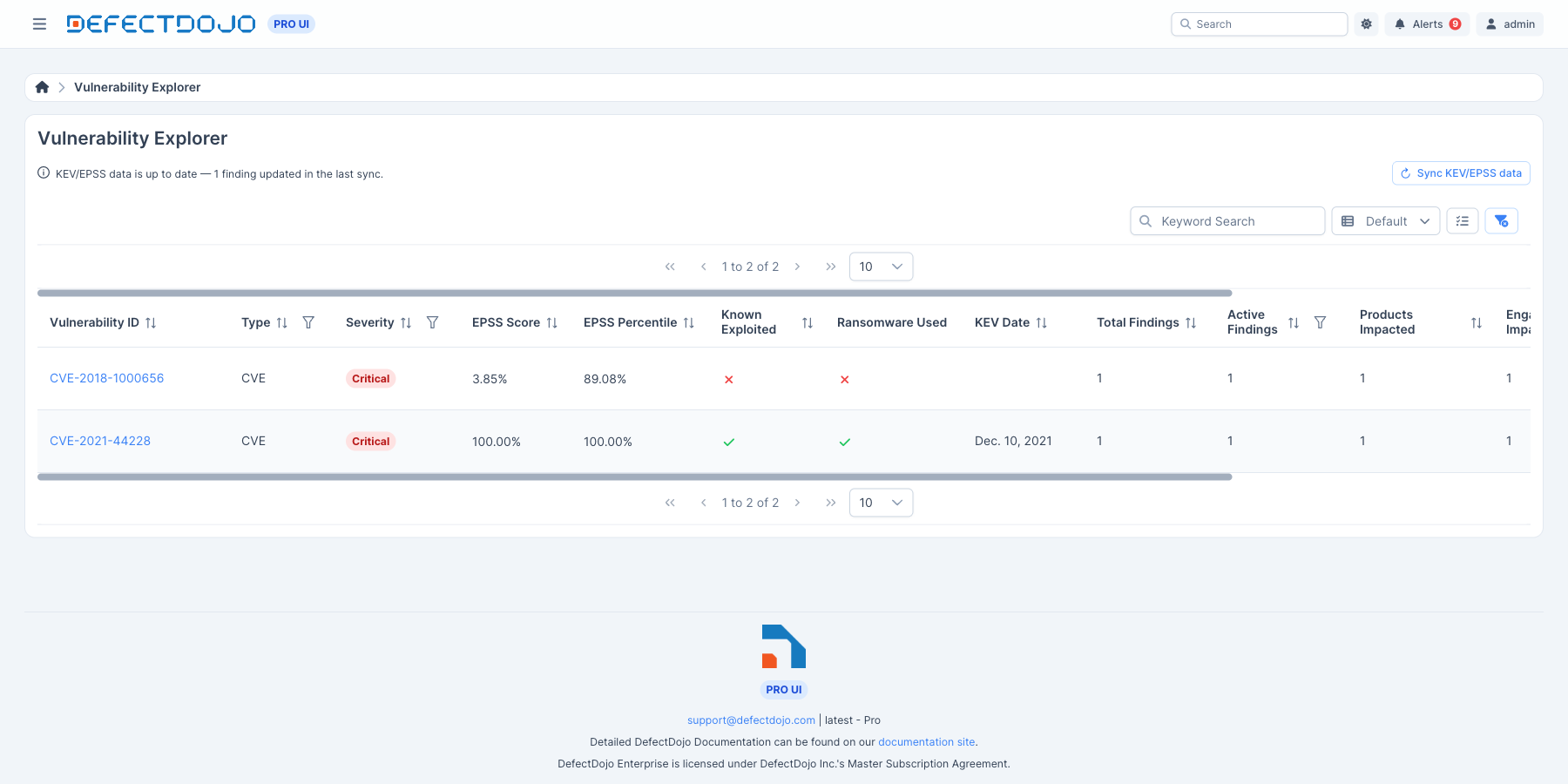
These values describe the vulnerability itself, so they are identical no matter how many Findings reference it. EPSS Score, EPSS Percentile, Known Exploited and KEV Date are all sortable, which makes this the fastest way to answer “which vulnerabilities in my environment are actually being exploited?” — sort by EPSS Score descending, or sort by Known Exploited to bring the catalog-listed CVEs to the top.
Blank values always sort last, in both directions, so sorting by EPSS Score descending opens on the highest-scoring vulnerabilities rather than on the ones that have not been enriched yet. To sort by more than one column, hold Ctrl (Cmd on macOS) and click each additional column header. For example, sort by Known Exploited and then by EPSS Score to rank the catalog-listed vulnerabilities by exploit probability.
Each row’s Total Findings count links through to the Findings list filtered to that vulnerability, so you can go from “this CVE is KEV-listed” to “here is everything it affects” in one click.
Filtering the Vulnerability Explorer
Every column except Vulnerability ID has a filter, opened from the funnel icon in its header:
| Column | Filter |
|---|---|
| Type, Severity | Pick one or more values. A vulnerability matches if any of the picked values apply. |
| EPSS Score, EPSS Percentile | Equals, Not Equals, Greater Than, Greater Than or Equal To, Less Than, Less Than or Equal To. Enter the value as the percentage the column shows (for example 10 for 10%). |
| Known Exploited, Ransomware Used | Yes or No. Vulnerabilities that have not been enriched yet match neither. |
| KEV Date, First Seen, Last Seen | On, Before, After, During (a date range), or Within (a recent window such as the past 30 days). |
| Total Findings, Assets Impacted, Engagements Impacted | The number comparisons above, plus In List and Not In List. |
| Active Findings | Whether inactive and duplicate Findings are counted. |
Filters combine, so a vulnerability must match all of them to be listed. A filter such as EPSS Score greater than 0 also hides every vulnerability that has no EPSS score yet.
The count and date filters apply to the values shown in the row, after the other filters have narrowed which Findings are counted. For example, filtering Severity to Critical and Total Findings to greater than 5 lists the vulnerabilities with more than five Critical Findings. The counts only ever include Findings you have access to.
Telling “no data” apart from “not exploited”
A blank KEV/EPSS column and a red ✗ mean different things:
- Red ✗ / a score — this vulnerability was checked. A ✗ under Known Exploited means CISA does not list it.
- Blank — this vulnerability has never been enriched, so its exploitation status is simply unknown.
Here the same Explorer has never been synced, so every KEV/EPSS column is blank rather than showing zeros or ✗ marks:
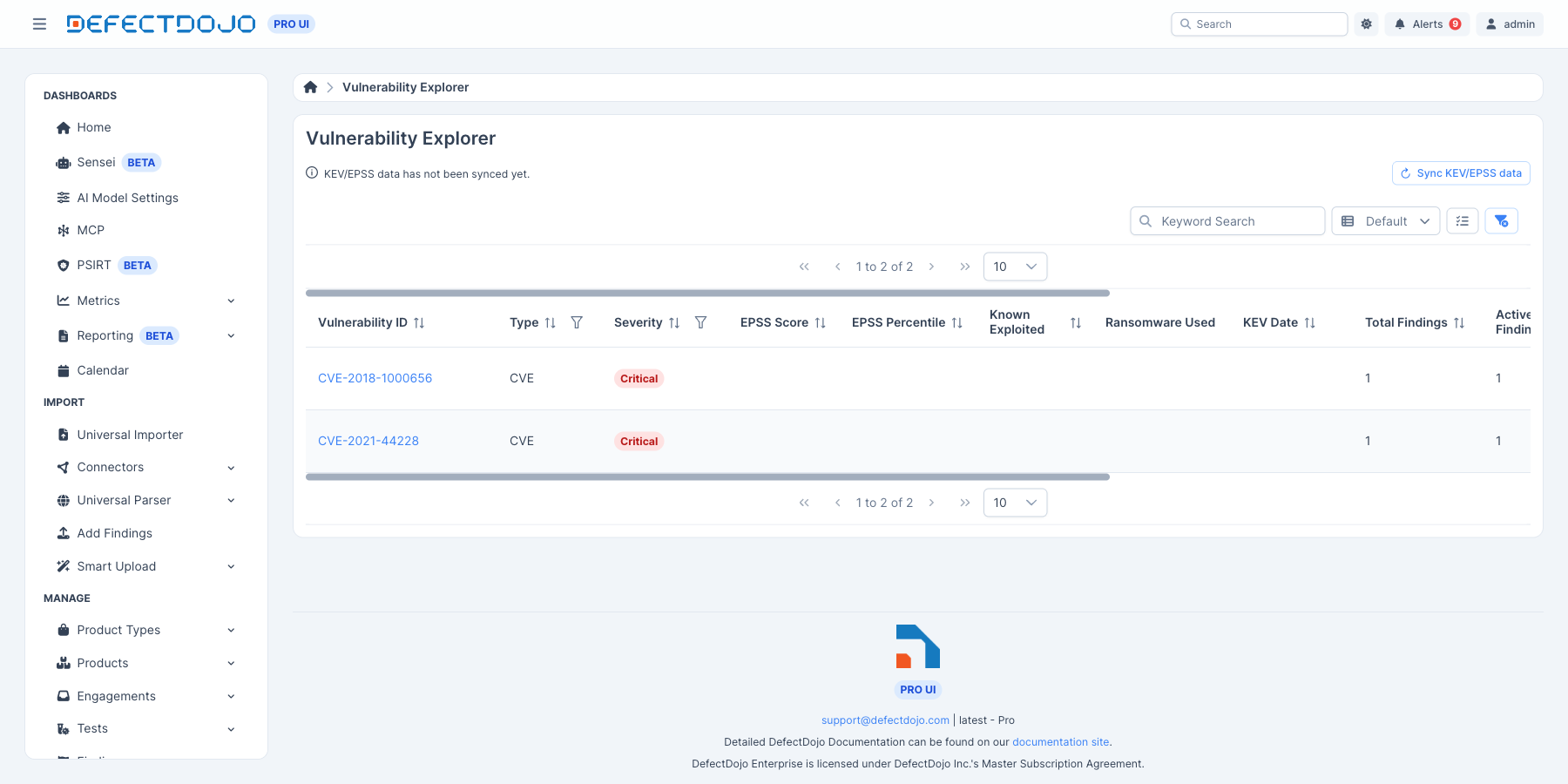
The same distinction appears on the Finding itself. A Finding whose CVEs have not been enriched yet says so plainly, and links to the Explorer where you can start a sync:

Once enrichment has run, the same panel reports what was actually found:

This matters because “we have not looked yet” and “we looked and it is not exploited” would otherwise be indistinguishable, and only one of them is a reason to relax.
Running a sync on demand
You do not have to wait for the daily cycle. The Sync KEV/EPSS Data button at the top of the Vulnerability Explorer starts a sync immediately:
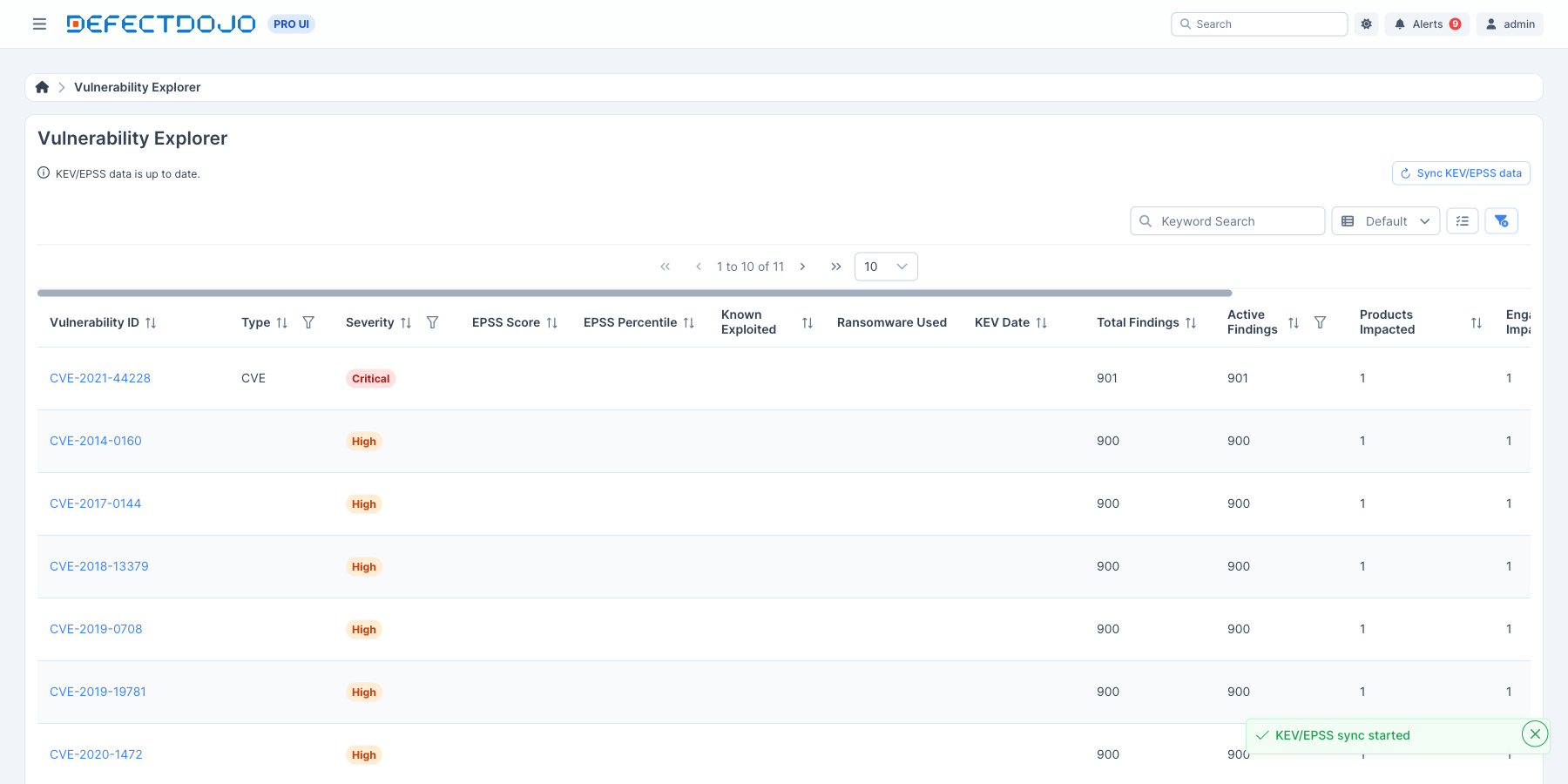
While a sync is running, the button is disabled and a progress bar appears in its place, along with an estimate of the time remaining once enough work has completed to project one. The status line above it reports what is happening — first that DefectDojo is checking which vulnerabilities changed, then how many Findings have been updated so far. When the run finishes, the line reports the outcome: how many Findings changed, that everything was already up to date, or — if no source is configured — that the sync did not run.
Only one sync runs at a time. Pressing the button while one is already in progress simply attaches to the run that is already going rather than starting a second one, so it is safe to press if you are not sure whether a sync is underway. A sync is also safe to repeat: if nothing has changed since the last run, it rewrites nothing.
This is the fastest way to pull in EPSS and KEV changes published since the last daily cycle, and to fill in any Findings that are still showing no enrichment data.
How it impacts priority and risk
EPSS and KEV are not just informational badges — they are direct inputs to the DefectDojo Pro prioritization engine. Each Finding’s priority score combines several components (severity, exposure, asset context, and more); EPSS and KEV drive the external score component, which rewards vulnerabilities that are likely to be — or are known to be — exploited.
The external score is derived from whichever of the following signals is strongest:
- EPSS contributes in proportion to its score — a higher probability of exploitation contributes more.
- KEV listing contributes a fixed weight: being Known Exploited or used in ransomware applies a meaningful boost, and a CVE that is both Known Exploited and used in ransomware applies the largest boost.
The larger of the two signals wins, so a Finding gets full credit for either a high EPSS score or a KEV listing without being penalized for lacking the other. This external score is then blended into the Finding’s overall priority alongside its severity and exposure. The net effect: a KEV-listed or high-EPSS Finding rises above an otherwise-comparable Finding that has neither, focusing remediation on what is genuinely most likely to be attacked.
EPSS and KEV are the baseline — Threat Intelligence extends it. With Threat Intelligence Enrichment enabled, the same external score also recognizes weaponized public exploits, Nuclei detection templates, proof-of-concept code, and confirmed active exploitation, each acting as a floor on the EPSS scale. It additionally adds the Actively-Exploited Risk Floor, which stops a Finding that is being exploited in the wild from sitting in a low Risk band just because its base severity is Low. Like EPSS and KEV, these signals only ever raise a score.
This flows automatically — priority is recomputed for exactly the Findings updated by each enrichment run, so prioritization stays in step with the latest threat intelligence.
Note: EPSS and KEV influence the priority score. They do not change a Finding’s Severity field. They can, however, affect the SLA clock: if your SLA configuration has Cap by KEV due date enabled, a KEV-listed Finding’s SLA deadline is pulled in to CISA’s remediation due date for that CVE. Where a Finding carries several KEV-listed CVEs, the earliest due date applies.
Filtering and viewing enriched Findings
Once Findings are enriched, the EPSS and KEV values are available throughout the Pro UI:
- On the Finding — EPSS score, EPSS percentile, Known Exploited, Ransomware Used, and KEV Date all display on the Finding detail. They can also be set by hand in the Threat Intelligence panel of the Add and Edit Finding forms, which matters for a Finding that has no CVE and is therefore never enriched. On a Finding that does reference a CVE, the next sync overwrites hand-entered values; see Editing Findings.
- Sorting — Finding tables can be ordered by EPSS score / percentile to surface the most likely-to-be-exploited Findings first.
- Filtering — the Findings list offers Known Exploited and Ransomware Used filters, so you can build views or reports scoped to confirmed real-world-exploited vulnerabilities.
A common workflow is to filter to Known Exploited = true, then sort by priority, to produce a “fix these first” queue backed by confirmed exploitation.
Configuration
On DefectDojo Cloud, EPSS and KEV enrichment is enabled and maintained for you — there are no source toggles, feed URLs, or thresholds to set, and the daily sync is managed by DefectDojo. The weightings that translate EPSS and KEV into priority are built into the prioritization engine.
If EPSS or KEV data is not appearing on Findings you expect it to (and those Findings do carry CVEs), start by checking the status line on the Vulnerability Explorer — it reports the outcome of the most recent sync, including when no source is configured. If that looks healthy and data is still missing, contact DefectDojo support, who can confirm whether the daily sync is delivering data to your instance.
On-premise installations configure enrichment differently — each source can be enabled or disabled and pointed at a custom feed URL under the Tuner’s finding-enrichment settings. That configuration does not apply to Cloud, where the data is delivered by DefectDojo.