

Deduplication Tuning (Pro) (Pro)
Deduplication Tuning is a DefectDojo Pro feature that gives you fine-grained control over how findings are deduplicated, allowing you to optimize duplicate detection for your specific security testing workflow.
Deduplication Settings
In DefectDojo Pro, you can access Deduplication Tuning through: Settings > Pro Settings > Deduplication Settings
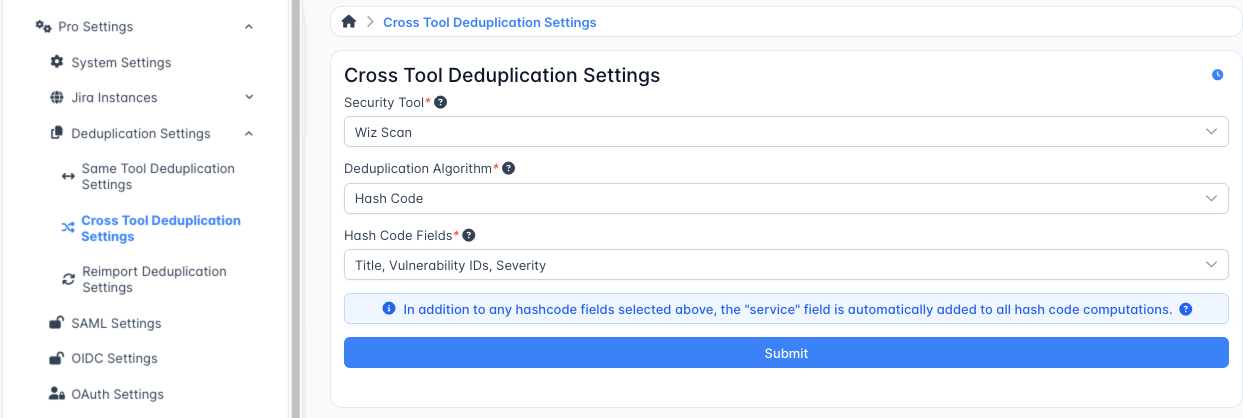
The Deduplication Settings page offers three key configuration areas:
- Same Tool Deduplication
- Cross Tool Deduplication
- Reimport Deduplication
Same Tool Deduplication
Same Tool Deduplication is enabled by default for all security tool parsers. This ensures findings from consecutive scans using the same tool are properly deduplicated.
To adjust Same Tool Deduplication:
- Select a specific Security Tool from the dropdown
- Choose a Deduplication Algorithm from the available options
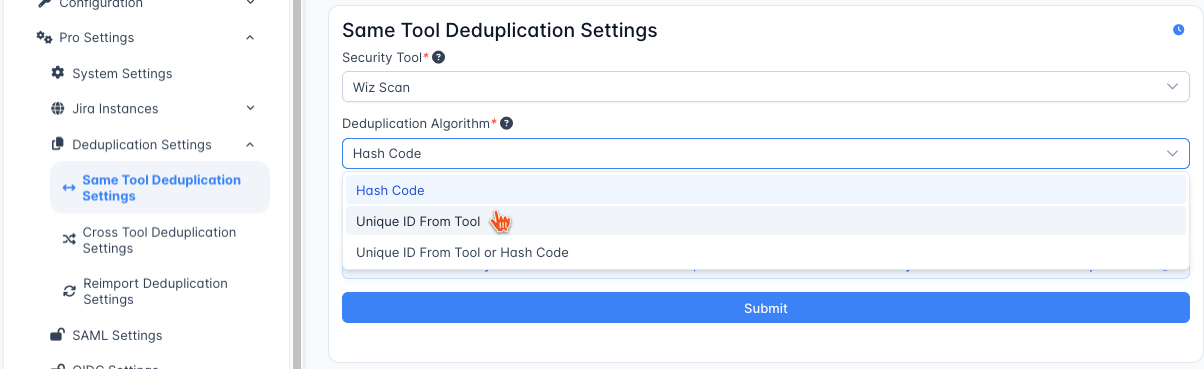
Available Deduplication Algorithms
DefectDojo Pro offers three deduplication methods for same-tool deduplication:
Hash Code
Uses a combination of selected fields to generate a unique hash. When selected, a third dropdown will appear showing the fields being used to calculate the hash.
Unique ID From Tool
Leverages the security tool’s own internal identifier for findings, ensuring perfect deduplication when the scanner provides reliable unique IDs.
This algorithm can be useful when working with SAST scanners, or situations where a Finding can “move around” in source code as development progresses.
Unique ID From Tool or Hash Code
Attempts to use the tool’s unique ID first, then falls back to the hash code if no unique ID is available. This provides the most flexible deduplication option.
Cross Tool Deduplication
Cross Tool Deduplication is disabled by default, as deduplication between different security tools requires careful configuration due to variations in how tools report the same vulnerabilities.
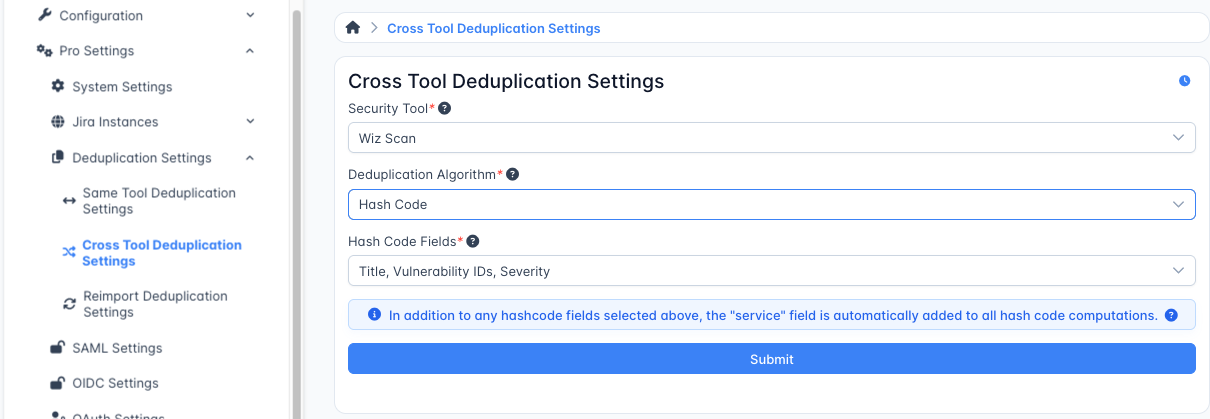
To enable Cross Tool Deduplication:
- Select a Security Tool from the dropdown
- Change the Deduplication Algorithm from “Disabled” to “Hash Code”
- Select which fields should be used for generating the hash in the Hash Code Fields dropdown
Unlike Same Tool Deduplication, Cross Tool Deduplication only supports the Hash Code algorithm, as different tools rarely share compatible unique identifiers.
Reimport Deduplication
⚠️ Reimport processes can completely discard Findings before they are recorded. This can lead to data loss if set incorrectly, so Reimport Deduplication settings should be adjusted with caution.
Reimport Deduplication Settings can be used to set an algorithm for Universal Parsers, or for a Generic Findings Import Parser.
Reimport Deduplication cannot be adjusted for other tools by default. Users who want to adjust the Reimport Deduplication algorithm for other tools in their instance should reach out to for assistance.
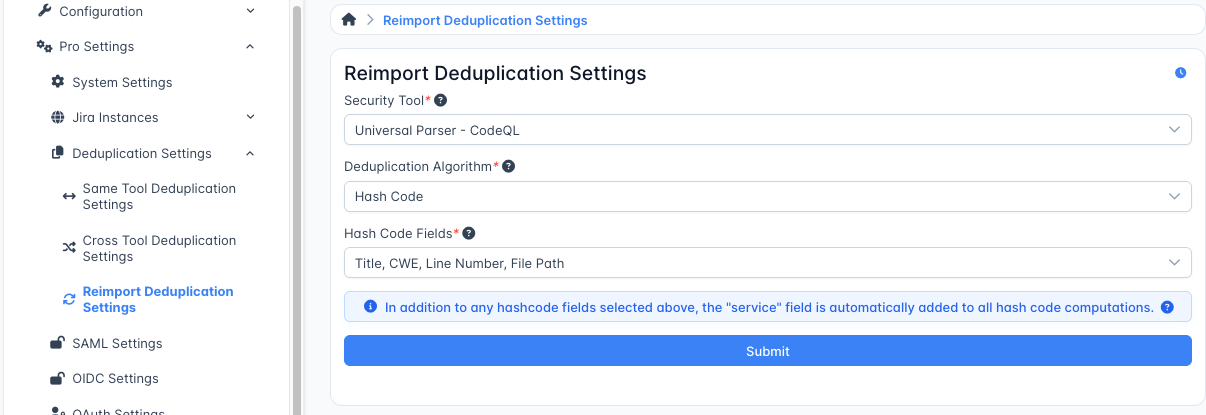
When configuring Reimport Deduplication:
- Select the Security Tool (Universal or Generic Parser)
- Choose the appropriate Deduplication Algorithm
The same three algorithm options are available for Reimport Deduplication as for Same Tool Deduplication:
- Hash Code
- Unique ID From Tool
- Unique ID From Tool or Hash Code
Reimport can completely discard Findings before they are recorded, so Reimport Deduplication settings should be adjusted with caution.
Deduplication Best Practices
For optimal results with Deduplication Tuning:
- Start with defaults: The preconfigured deduplication settings work well for most scenarios
- Test changes carefully: After adjusting deduplication settings, monitor a few imports to ensure proper behavior.
- Adjustments to deduplication will retroactively adjust the hash values for findings already imported for the given test type that was changed. The recalculation is applied in the background to all findings in the database associated with the given test type that was changed. Please note that since the process is occurring in the background, immediate changes may not be observed.
- Use Hash Code for cross-tool deduplication: When enabling cross-tool deduplication, select fields that reliably identify the same finding across different tools (such as vulnerability name, location, and severity). IMPORTANT Each tool enabled for cross-tool deduplication MUST have the same fields selected.
- Avoid overly broad deduplication: Cross-tool deduplication with too few hash fields may result in false duplicates
By tuning deduplication settings to your specific tools, you can significantly reduce duplicate noise.
Locked Findings
Whenever Deduplication Settings are changed for a given tool, Deduplication hashes are re-calculated for that tool across the entire DefectDojo instance.