

About Deduplication
DefectDojo is designed to ingest bulk reports from tools, creating one or more Findings based on the content of the report. When using DefectDojo, you’ll most likely be ingesting reports from the same tool on a regular basis, which means that duplicate Findings are highly likely.
This is where Deduplication comes in, a Smart feature which you can set up to automatically manage duplicate Findings.
How DefectDojo handles duplicates
- First, you import Test 1. Your report contains a vulnerability which is recorded as Finding A.
- Later, you import Test 2 which contains the same vulnerability. This will be recorded as Finding B, and Finding B will be marked as a duplicate of Finding A.
- Later still, you import Test 3 which also contains that vulnerability. This will be recorded as Finding C, which will be marked as a duplicate of Finding A.
By creating and marking Duplicates in this way, DefectDojo ensures that all the work for the ‘original’ vulnerability is centralized on the original Finding page, without creating separate contexts, or giving your team the impression that there are multiple separate vulnerabilities which need to be addressed.
By default, these Tests would need to be nested under the same Product for Deduplication to be applied. If you wish, you can further limit the Deduplication scope to a single Engagement.
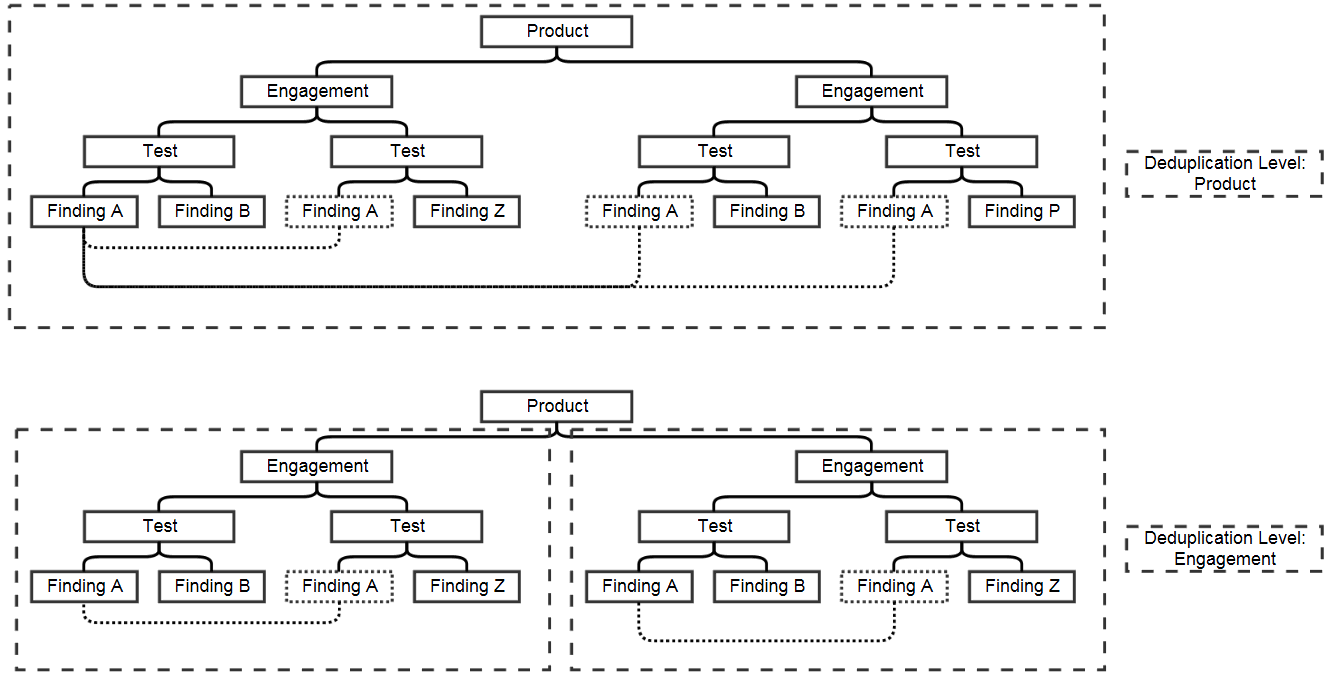
Duplicate Findings are set as Inactive by default. This does not mean the Duplicate Finding itself is Inactive. Rather, this is so that your team only has a single active Finding to work on and remediate, with the implication being that once the original Finding is Mitigated, the Duplicates will also be Mitigated.
Reimport Deduplication
Deduplication and Reimport are similar processes, but they use different algorithms to identify Finding matches.
- When you Reimport to a Test, the Reimport process looks at incoming Findings, compares hash codes, and then discards any matches. Those matches will never be created as Findings or Finding Duplicates.
However, any Findings that remain after Reimport Deduplication are still subject to Same-Tool Deduplication. So if you use narrower a scope for Same-Tool Deduplication, you can end up with Duplicates within a Reimport pipeline.
Example
Here’s a tool with a Reimport Deduplication algorithm which is different from the Same-Tool Deduplication algorithm.
| Deduplication Algorithm | Hash Code Fields |
|---|---|
| Reimport | Title, CWE, Severity, Description, Line Number |
| Same-Tool | Title, CWE, Severity, Description |
Let’s say you had a Finding in DefectDojo with a given line number. You re-scanned your environment and the line number of that vulnerability changed. You reimport to the same Test. Here’s what will happen during reimport, and deduplication:
- During Reimport, the Finding will not be matched to any Findings that already exist, because the line number is different. So a new Finding will be created in the Test.
- After Reimport is complete, the Same-Tool Deduplication algorithm will run. Same-Tool Deduplication does not consider line number in this configuration, so the new Finding will be labelled as a duplicate.
Reimport can completely discard Findings before they are recorded, so Reimport Deduplication settings should be adjusted with caution.
When are duplicates appropriate?
Duplicates are useful when you’re dealing with shared, but discrete Testing contexts. For example, if your Product is uploading Test results for two different repositories, which need to be compared, it’s useful to know which vulnerabilities are shared across those repositories.
However, if DefectDojo is creating excess duplicates, this can also be a sign that you need to adjust your pipelines or import processes.
What do my duplicates indicate?
- The same vulnerability, but found in a different context: this is the appropriate way to use Duplicate Findings. If you have many components which are affected by the same vulnerability, you would likely want to know which components are affected to understand the scope of the problem.
- The same vulnerability, found in the same context: better options exist for this case. If the Duplicate Finding does not give you any new context on the vulnerability, or if you find yourself frequently ignoring or deleting your duplicate Findings, this is a sign that your process can be improved. For example, Reimport allows you to effectively manage incoming reports from a CI/CD pipeline. Rather than create a completely new Finding object for each duplicate, Reimport will make a note of the incoming duplicate without creating the Duplicate Finding at all.
Overview
DefectDojo supports four deduplication algorithms that can be selected per parser (test type):
- Unique ID From Tool: Uses the scanner-provided unique identifier.
- Hash Code: Uses a configured set of fields to compute a hash.
- Unique ID From Tool or Hash Code: Prefer the tool’s unique ID; fall back to hash when no matching unique ID is found.
- Legacy: Historical algorithm with multiple conditions; only available in the Open Source version.
How endpoints are assessed per algorithm
Endpoints can influence deduplication in different ways depending on the algorithm and configuration.
Unique ID From Tool
- Deduplication uses
unique_id_from_tool(orvuln_id_from_tool). - Endpoints are ignored for duplicate matching.
- A finding’s hash may still be calculated for other features, but it does not affect deduplication under this algorithm.
Hash Code
- Deduplication uses a hash computed from fields specified by
HASHCODE_FIELDS_PER_SCANNERfor the given parser. - The hash also includes fields from
HASH_CODE_FIELDS_ALWAYS(see Service field section below). - Endpoints can affect deduplication in two ways:
- If the scanner’s hash fields include
endpoints, they are part of the hash and must match accordingly.
- If the scanner’s hash fields include
- If the scanner’s hash fields do not include
endpoints, optional endpoint-based matching can be enabled viaDEDUPE_ALGO_ENDPOINT_FIELDS(OS setting). When configured:- Set it to an empty list
[]to ignore endpoints entirely. - Set it to a list of endpoint attributes (e.g.
["host", "port"]). If at least one endpoint pair between the two findings matches on all listed attributes, deduplication can occur.
- Set it to an empty list
Unique ID From Tool or Hash Code
A finding is a duplicate with another if they have the same unique_id_from_tool OR the same hash_code.
The endpoints also have to match for the findings to be considered duplicates, see the Hash Code algorithm above.
Legacy (Open Source only)
- Deduplication considers multiple attributes including endpoints.
- Behavior differs for static vs dynamic findings:
- Static findings: The new finding must contain all endpoints of the original. Extra endpoints on the new finding are allowed.
- Dynamic findings: Endpoints must strictly match (commonly by host and port); differing endpoints prevent deduplication.
- If there are no endpoints and both
file_pathandlineare empty, deduplication typically does not occur.
Background processing
- Dedupe is triggered on import/reimport and during certain updates run via Celery in the background.
Service field and its impact
- By default,
HASH_CODE_FIELDS_ALWAYS = ["service"], meaning theserviceassociated with a finding is appended to the hash for all scanners. - Practical implications:
- Two otherwise identical findings with different
servicevalues will produce different hashes and will not deduplicate under Hash-based paths. - During import/reimport, the
Servicefield entered in the UI can override the parser-provided service. Changing it can change the hash and therefore affect deduplication outcomes. - If you want service to have no impact on deduplication, configure
HASH_CODE_FIELDS_ALWAYSaccordingly (see the OS tuning page). Removingservicefrom the always-included list will stop it from affecting hashes.
- Two otherwise identical findings with different
Delete Deduplicate Findings
If you have an excessive amount of duplicate Findings which you want to delete, you can set Delete Deduplicate Findings as an option in the System Settings.
Delete Deduplicate Findings, combined with the Maximum Duplicates field allows DefectDojo to limit the amount of Duplicate Findings stored. When this field is enabled, DefectDojo will only keep a certain number of Duplicate Findings.
Which duplicates will be deleted?
The original Finding will never be deleted automatically from DefectDojo, but once the threshold for Maximum Duplicates is crossed, DefectDojo will automatically delete the oldest Duplicate Finding.
For example, let’s say that you had your Maximum Duplicates field set to ‘1’.
- First, you import Test 1. Your report contains a vulnerability which is recorded as Finding A.
- Later, you import Test 2 contains the same vulnerability. This will be recorded as Finding B, and Finding B will be marked as a duplicate of Finding A.
- Later still, you import Test 3 which also contains that vulnerability. This will be recorded as Finding C, which will be marked as a duplicate of Finding A. At this time, Finding B will be deleted from DefectDojo as the threshold for maximum duplicates has been crossed.
Applying this setting
Applying Delete Deduplicate Findings will begin a deletion process immediately. This setting can be applied on the System Settings page. See Enabling Deduplication for more information.
Troubleshooting Deduplication
Sometimes, Deduplication does not work as expected. Here are some examples of ways that Deduplication might not be working correctly, along with possible solutions.
| What you see | Most likely cause | What to tune |
|---|---|---|
| Reimport closes an old Finding and creates a new one when only the line number changed | Reimport matching uses unstable fields (for example, line number) | Reimport Deduplication (prefer stable IDs or stable hash fields) |
| Multiple Findings are created in the same Test that you believe should be duplicates | Deduplication matching is not configured for that tool or scope | Same Tool Deduplication (and consider “Delete Deduplicate Findings” behavior) |
| Duplicates are created across different tools | Cross-tool matching is disabled or too strict | Cross Tool Deduplication (Pro only) (hash-based matching) |
| Excess duplicates of the same Finding are being created, across Tests | Asset Hierarchy is not set up correctly | Consider Reimport for continual testing |