

Sensei Reference (Pro)
Note: Sensei is a DefectDojo Pro-only feature and is currently in BETA.
A quick reference for the statuses, actions, and limits you’ll encounter while using Sensei.
Repository statuses
The status shown for an onboarded repository on the Sensei hub:
| Status | Meaning |
|---|---|
| Active | Onboarded and ready to scan. |
| Pull Request Open | Sensei has an open pull request against the repository. |
| Pull Request Closed | A Sensei pull request was closed. |
| Error | The last operation failed: check Scan Activity for the root cause. |
| Not Configured | The repository is connected but not yet configured. |
Candidate and fix statuses
Auto-fix candidates and fix records move through these states:
| Status | Meaning |
|---|---|
| Candidate | Staged by a scan’s auto-fix criteria. Nothing runs until you approve. |
| In Progress | Approved: Sensei is generating the fix and will open a pull request. |
| PR Open | A fix pull request is open; the badge links to it. |
| Failed | The fix could not be completed; it stays listed so it doesn’t disappear silently. |
A cloud finding fixed directly (see CSPM) adds three more, tracked on the hub’s Cloud Remediations tab: Applied in Cloud (the change landed on the live resource — the direct-path analog of PR Open), Revert in Progress, and Reverted.
Repository row actions
Each onboarded repository has a row-actions menu on the Sensei hub:
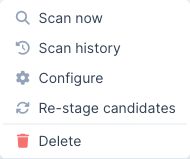
- Scan Now: start an on-demand scan (opens the branch picker).
- Scan History: view this repository’s past scans.
- Configure: reopen the configuration form (PR reporting, automated fixes, Asset linkage).
- Re-stage Candidates: re-evaluate the repository’s findings against the auto-fix criteria and stage fresh candidates.
- Delete: remove the repository from Sensei. This stops scanning it; it does not delete the underlying asset or findings.
Quotas and metering
Sensei is metered against your DefectDojo Pro license, shown as meters at the top of the hub:
- Fixes: remediations applied against your prepaid limit. Approving a candidate or triggering a fix consumes from this quota; when it is exhausted, further fixes are blocked (a warning banner appears) until the limit is raised.
- Onboarded Repositories: repositories onboarded against your repository limit. When it is reached, onboarding new repositories is blocked.
- Onboarded Cloud Accounts: cloud accounts onboarded against your cloud-account limit (
sensei_cloud_account_limit), shown when Sensei is licensed (CSPM has no feature flag of its own). When it is reached, onboarding new accounts is blocked. The Fixes quota is shared — an AppSec fix and a cloud remediation both spendsensei_fix_limit— and the Fixes card breaks its total down by capability. See CSPM → Quotas.
To raise a limit, contact your DefectDojo account team.
GitLab specifics
GitLab is supported alongside GitHub (gitlab.com and self-managed). The scan-and-fix behavior is identical; these are the GitLab-specific details:
- Connection: a project or group access token (role Developer, or Maintainer if push rules require it) with the
apiandwrite_repositoryscopes, not a GitHub App. See Set up Sensei. - Webhook: each onboarded project needs a webhook to
…/sensei/gitlab/webhooks(with the connection’s secret) subscribed to Push, Merge request, and Comment events. Adding a webhook requires Maintainer/Owner on the project. - Merge requests, not pull requests: fixes open a merge request against the default branch; the
/fixcomment works on merge-request notes, from project members with Developer access or higher. - Commit-status gate: the PR status check is a GitLab commit status on the merge request’s head commit:
runningwhile scanning, thensuccessorfailed(fail-on-new). GitLab has no neutral state, so a non-gating scan that still has findings shows a green status; the summary note carries the finding details. - Self-managed: point the GitLab Base URL at your instance; DefectDojo clones and calls the API against that host.
Bitbucket specifics
Bitbucket Cloud and Server/Data Center are supported. The scan-and-fix behavior is identical; these are the Bitbucket-specific details:
- Connection: OAuth (recommended), an Atlassian API token (used with your account email), or a repository/workspace access token. See Set up Sensei. App passwords are deprecated and not supported.
- Workspace scoping (Cloud): API/access tokens are workspace-bound, so a workspace is required for Cloud; OAuth is user-context and discovers accessible workspaces automatically.
- Webhook: each onboarded repository needs a webhook to
…/sensei/bitbucket/webhooks(with the connection’s secret, verified via HMAC-SHA256X-Hub-Signature) subscribed to Push, Pull request (created/updated/merged/declined), and Pull request comment events. - Build-status gate: the PR status check is posted as a Bitbucket build status on the head commit (
INPROGRESS→SUCCESSFUL/FAILED). Bitbucket has no neutral state, so a non-gating scan maps toSUCCESSFULand the summary comment carries the detail. The build-status link must be a public URL, so it uses your DefectDojo host. - Repository names:
workspace/repo(Cloud) orPROJECTKEY/repo(Server/Data Center). /fixcomments: DefectDojo runs a/fixonly when the commenter has write access to the repository, so the connection must be able to read repository permissions (a workspace admin’s OAuth or token on Cloud). If it cannot,/fixcomments do nothing; the Fix button in DefectDojo still works.- Server/Data Center: set the Base URL to your host; DefectDojo uses the v1.0 REST API and
/scm/…git paths.
Azure DevOps specifics
Azure DevOps Repos are supported via a Personal Access Token. The scan-and-fix behavior is identical; these are the Azure-specific details:
- Connection: a PAT with the Code (Read, Write, & Manage) scope, plus the organization. Azure DevOps OAuth apps are being retired, so a PAT is the recommended credential. See Set up Sensei.
- Webhook: Azure Service Hooks authenticate with HTTP Basic (not an HMAC) and use one subscription per event. Create subscriptions to
…/sensei/azure/webhooksfor Code pushed and Pull request created/updated/merged, with the connection’s Basic username/password. - Commit-status gate: the PR status check is posted as a Git commit status on the head commit.
- Repository names:
project/repo(the organization is stored on the connection). - Azure DevOps Server: set the Base URL to your on-prem collection URL.
- No
/fixcomments: Azure DevOps cannot tell DefectDojo whether a commenter can push to the repository, so/fixcomments are not acted on. Use the Fix button in DefectDojo instead.
GitHub Enterprise Server specifics
GitHub Enterprise Server uses the same GitHub App model as github.com; only the host differs:
- Connection: because the App-manifest auto-create flow is github.com-only, create the App manually on your GHES host and enter its credentials plus the Enterprise host via Set up manually. See Connect GitHub Enterprise Server. DefectDojo derives the API (
/api/v3) and web origins from the host. - Coexistence: a github.com App connection and a GHES App connection can be configured on the same instance; each repository resolves to the connection it was onboarded through.
- Reachability: DefectDojo must reach the GHES API host, and GHES must reach DefectDojo’s
…/sensei/webhooksendpoint (internal hosts are fine if both sides can connect).
Cloud (CSPM) specifics
Cloud accounts are the CSPM analog of onboarded repositories; the full flow is on the Cloud Security Posture (CSPM) page. Two reference points worth calling out:
- Two credentials, two jobs. The scan credential is read-only (it only reads posture). A direct fix (“Fix in Cloud”) uses a separate write credential, supplied per account and never widening the scan credential. A read-only account can be scanned but not directly remediated.
- Direct fixes are reversible and drift-checked. Sensei snapshots the resource’s prior state before applying a change and fingerprints it; a Revert restores that state but refuses if the resource has drifted out-of-band since the fix. Statuses (Applied in Cloud / Reverted / Failed) live on the hub’s Cloud Remediations tab.
Troubleshooting
- The Sensei button on a finding says “Configure Asset.” The finding’s Asset isn’t onboarded. Click it to onboard a repository for that Asset, then return to the finding.
- A fix shows “Failed” in Auto-fix Candidates or Scan Activity. Open Scan Activity and check the Root Cause / Details for that run. Failed fixes remain listed so they don’t disappear before producing a PR; you can re-stage and retry.
- A repository isn’t listed when onboarding. Only repositories the connection can access are shown. On GitHub, confirm the App is installed on the correct organization and its repository access includes the repository. On GitLab, confirm the access token’s scope covers the project. On Bitbucket Cloud, confirm the workspace is set (tokens are workspace-scoped). On Azure DevOps, confirm the PAT’s organization matches and its Code scope is granted.
- Scans or fixes never start after a webhook. Confirm the repository’s webhook points at the provider’s receiver (
…/sensei/{gitlab,bitbucket,azure}/webhooks, or…/sensei/webhooksfor GitHub) with the correct secret/credentials, and subscribes to push + pull-request (+ comment) events. The provider’s recent deliveries should showHTTP 200. Webhook-driven runs fire only for repositories onboarded in hosted mode; a push to a non-default branch is scanned via its pull request, not on its own. - Nothing is happening after a scan. Check that automated fixes are enabled (and your severity/risk thresholds match findings) on the repository’s configuration, and that your Fixes quota isn’t exhausted.
- Approve is disabled on every candidate. The hub says which of the two reasons applies, and they need different actions. “Your fix quota is exhausted” means the fixes on your license have all been used, so ask your DefectDojo administrator to raise the limit. “No fixes are included in this license” means no fix quota was ever provisioned: scanning and candidate staging still work so you can see what Sensei would fix, but approving needs a quota to be added.
- A finding is still open after Sensei fixed it. Expected: the pull request changes your code, not what is running. The badge says whether the change is waiting to be merged or waiting to be deployed, and the finding closes on the next scan that sees the fix in place — for cloud findings, the next scan after the infrastructure change is applied. See A fix does not close the finding on its own.
- A fixed finding keeps reappearing in new scans. Also expected while the fix is outstanding, and it does not cost you extra fixes: Sensei links each reappearance back to the original and will not stage a second candidate or open a second pull request for it.
🔎 Still in BETA: Sensei is evolving quickly. If behavior doesn’t match this guide, check the Pro changelog for recent changes.
Scheduling repository scans
Enable the Scheduling Service and Scan Cadence Assurance flags. The Scheduling Service requires a working orchestration deployment. Configure a hosted repository with scanning enabled, a default branch, and an associated product, then open its Schedule section. The default recurring schedule runs at 00:00 UTC every Monday. Recurring runs must start on the hour, at least six hours apart, with at most four selected hours per day. Single-run schedules remain available through the shared scheduling form.
The repository appears in All Schedules with type Sensei. In-repo CI repositories show an unavailable state; configure their schedules in the CI provider.
Saving or changing a schedule records the acting user. Each run rechecks that the user is active and can import scans into the product, and uses that user’s DefectDojo API token. It does not use the worker’s shared token or fall back to a superuser. Failed identity checks produce a failed operation with an explanation and a product alert. An authorized user must save the schedule again to change its identity. Automatic retries of an existing run retain the original user and recheck permissions.
Scheduled scans use the repository’s default branch. When a scan is queued or running for the same repository, the operation is marked skipped and no duplicate is submitted. Successful dispatch records the Sensei scan-run ID in the scheduling operation result. The imported Test is what changes scan cadence status at the next evaluation.