

AI Model Settings (Pro)
Note: Sensei is a DefectDojo Pro-only feature and is currently in BETA.
When Sensei runs a scan or applies a fix DefectDojo-hosted (server-side, rather than in your own CI), it needs an LLM. AI Model Settings is where you choose that model and supply its credentials, once, instance-wide — the hosted worker uses this configuration instead of any per-repository secret.
You reach it from the sidebar under Sensei + AI → AI Model Settings. You need a global Maintainer or Owner role to change it.
On-premise only. This page exists only on on-premise (“local”) deployments, where you bring your own model. On DefectDojo Cloud the LLM is managed for you and this page is not shown.
Providers
Pick a provider from the LLM Provider dropdown. The fields below the dropdown change to match the provider you choose.
| Provider | Authenticates with |
|---|---|
| Claude (Anthropic) | an Anthropic API key |
| OpenAI | an OpenAI API key |
| Amazon Bedrock | AWS credentials (see How Bedrock access is determined) |
| Google Vertex AI | a GCP service account, or the engine’s ambient identity (see Google Vertex AI) |
Every provider also accepts an optional Model override (leave blank to use the provider’s default) and an optional API Base URL to point at an on-prem or self-hosted gateway.
All secrets are encrypted at rest and are write-only: once saved, the form shows only whether a secret is set, never its value. Leave a secret field blank when saving to keep the stored value; type a new value to replace it. The one exception is the API Base URL: a saved API key is kept only for the base URL it was saved with, so changing the base URL to a new gateway means entering the key again (clearing the base URL does not). Test connection follows the same rule.
Claude (Anthropic) and OpenAI
These providers use a single API key:
- Model (optional) — e.g. a specific Claude or OpenAI model. Blank uses the provider default.
- API Base URL (optional) — point at a self-hosted gateway instead of the provider’s public
API. Blank uses the default (
https://api.anthropic.com/https://api.openai.com). - LLM API Key — the provider API key.
Amazon Bedrock
Amazon Bedrock hosts Anthropic Claude models in your own AWS account, and it authenticates with AWS credentials rather than a single key, so its fields differ:
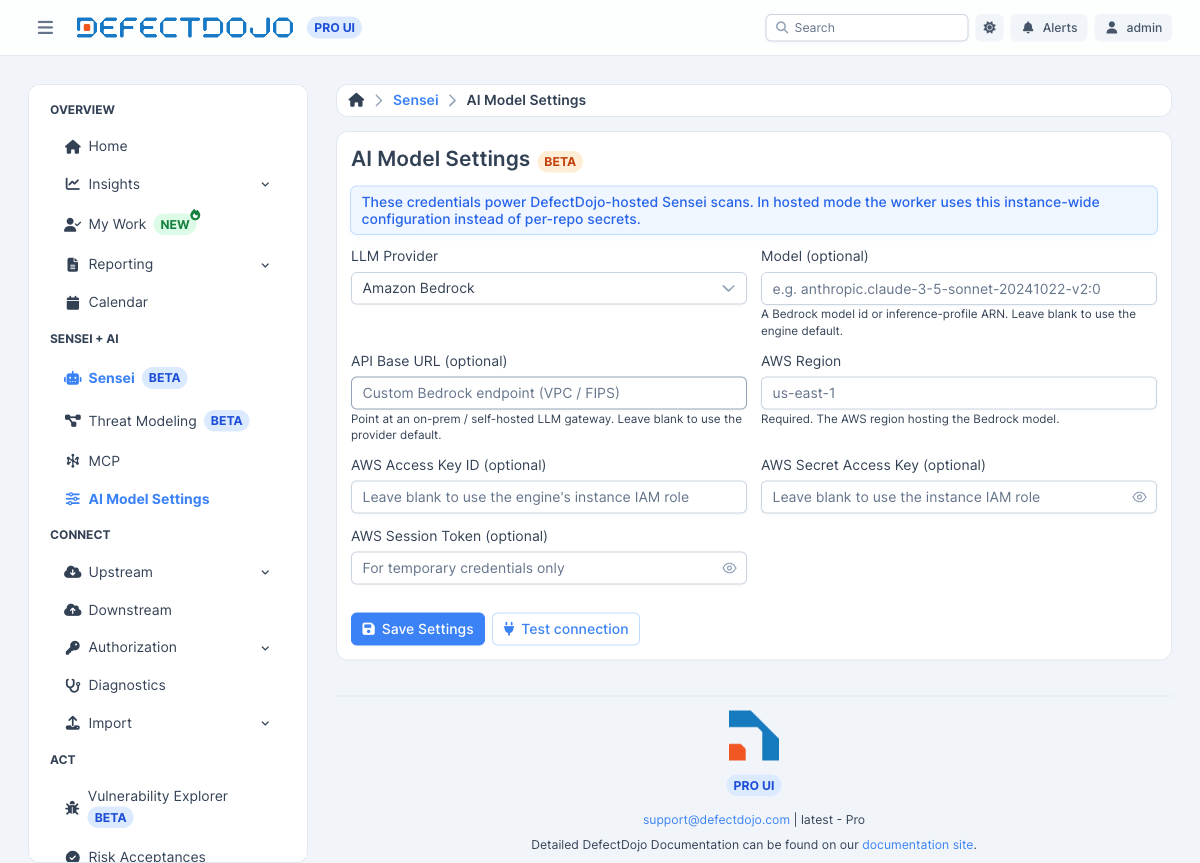
- Model (optional) — a Bedrock model id or inference-profile ARN, e.g.
anthropic.claude-3-5-sonnet-20241022-v2:0, or a cross-region inference profile likeus.anthropic.claude-sonnet-4-5-.... Some newer models are only reachable through an inference profile. Blank uses the engine default. - API Base URL (optional) — a custom Bedrock endpoint (for a VPC endpoint or FIPS). Blank uses the default AWS endpoint for the region.
- AWS Region — required. The region hosting the model, e.g.
us-east-1. - AWS Access Key ID / Secret Access Key / Session Token — optional (see below).
How Bedrock access is determined
The region is always required, but the AWS credentials are optional because the Sensei engine resolves them through the standard AWS credential chain, in this order:
- The static keys you enter here, if any. Provide an Access Key ID and Secret Access Key (and a Session Token for temporary STS credentials) to authenticate as a specific IAM identity.
- Otherwise, the engine’s ambient AWS identity. With the key fields left blank, the engine
uses whatever IAM role is attached to where it runs:
- EKS — an IRSA or EKS Pod Identity role bound to the Sensei engine’s service account.
- ECS — the task role.
- EC2, including a Docker Compose host running on an EC2 instance — the instance profile.
Note that IMDSv2’s default hop limit of
1blocks a metadata request coming from inside a container (it is one network hop too deep); set the instance’s metadata hop limit to2so the engine container can reach the instance role. - Lambda — the execution role.
Leaving the keys blank is the recommended setup when the engine runs inside AWS with an attached role: the workload’s own identity grants Bedrock access, so there are no long-lived keys to store or rotate.
Running on-prem or outside AWS? There is no ambient AWS identity to fall back on when the engine does not run inside AWS — a non-EKS Kubernetes cluster or a Docker Compose host in your own data center has none. In those deployments you must enter static AWS keys above; the “leave the keys blank” path applies only to AWS-hosted runtimes.
Either way, the identity used needs permission to invoke the Bedrock model (bedrock:InvokeModel)
in the chosen region.
Google Vertex AI
Google Vertex AI serves models from your own GCP project’s Model Garden. It is a single,
model-agnostic provider: the Model you enter selects the family, so one provider choice runs
any Vertex model. A gemini-* model id runs a Google Gemini model; anything else — or a blank
model, which defaults to a Claude model — runs an Anthropic Claude model on Vertex. Enable the
model you intend to use in your project’s Vertex Model Garden first.
Its fields differ from the key-based providers:
- Model (optional) — any model enabled in your project’s Model Garden, e.g.
claude-sonnet-4-6orgemini-2.5-pro. Blank uses the engine default (a Claude model). - Vertex Project ID — required. The GCP project hosting Vertex AI.
- Vertex Region — the Vertex region, e.g.
global(the default) orus-east5. - Service Account Key (JSON) — optional (see below).
How Vertex access is determined
The project is always required, but the service-account key is optional because the Sensei engine resolves GCP credentials in this order:
- The service-account key JSON you paste here, if any. The engine uses it to authenticate as that service account.
- Otherwise, the engine’s ambient GCP identity (Application Default Credentials) — the workload identity or attached service account of wherever the engine runs (for example a GKE Workload Identity binding). This only exists when the engine runs on GCP with an attached identity.
Either way, the service account needs the roles/aiplatform.user role on the project, and the
model must be enabled in that project’s Model Garden.
Running on-prem or outside GCP? There is no ambient GCP identity to fall back on when the engine does not run inside GCP. In those deployments, paste a service-account key above.
Test connection
Test connection validates the configuration before a scan relies on it:
- For Claude / OpenAI, it makes a minimal authenticated call to the provider.
- For Amazon Bedrock with static keys, it lists the region’s foundation models to confirm the credentials work.
- For Amazon Bedrock without static keys, it reports that the engine’s instance IAM role is used at runtime — DefectDojo can’t validate that role on the engine’s behalf, so confirm Bedrock access from the engine’s own environment.
- For Google Vertex AI, it makes a minimal call to the configured model (routed to the Claude or Gemini client by the model id), surfacing an authorization or model-availability error if the service account lacks access or the model is not enabled in the project’s Model Garden.
Save
Save Settings stores the configuration for the whole instance. From then on, DefectDojo-hosted Sensei scans and fixes use this model. See Fixing Findings with Sensei for how fixes run once a model is configured.