

About Sensei (Pro)
Note: Sensei is a DefectDojo Pro-only feature and is currently in BETA.
Sensei is DefectDojo’s AI-powered scan-and-fix capability for source code repositories. Connect a repository (through a GitHub App, GitLab, Bitbucket, or Azure DevOps) and Sensei scans it, imports the results as DefectDojo findings, and then uses a large language model to remediate those findings by opening pull/merge requests, all without leaving DefectDojo.
🔀 Multiple providers: Sensei supports GitHub (github.com and GitHub Enterprise Server), GitLab (gitlab.com and self-managed), Bitbucket (Cloud and Server/Data Center), and Azure DevOps, all with the same scan-and-fix flow. Where this guide says pull request, GitLab uses a merge request; the PR status check is posted as a GitLab/Azure commit status or a Bitbucket build status. Connection differs by provider (see Set up Sensei); everything after onboarding is identical.
- Scan-and-fix in one place: repositories are scanned and remediated from the Sensei page and from your findings, using the same normalized, deduplicated finding data as the rest of DefectDojo.
- Preview-first: Sensei stages fix candidates for review. Nothing is sent to an LLM and no pull request is opened until you approve, so there is no surprise cost or unexpected PR.
- Short-lived credentials: Sensei runs entirely through a GitHub App and uses short-lived installation tokens. There is nothing to paste and nothing to rotate.
- Metered and license-gated: Sensei is a Pro feature with per-instance quotas for fixes and onboarded repositories.
☁️ Beyond code — cloud posture (CSPM): the same scan-and-fix flow applies to cloud accounts. Connect an AWS account, Azure subscription, or GCP project; Sensei scans it for misconfigurations, imports them as findings, and remediates them by an IaC pull request or a reversible change to the live resource. AppSec and CSPM share one hub, selected by a capability card. See Cloud Security Posture (CSPM).
🤖 Beyond code — AI agents: the same hub can red-team a deployed AI agent. Point Sensei at your agent’s endpoint and it runs an autonomous attacker that probes it multi-turn and imports each confirmed break — prompt injection, jailbreaks, data leakage, unsafe tool use — as a finding. See AI Agent Red Teaming. (Beta.)
🧠 Before the code exists: Sensei also generates a threat model, attack paths and security requirements from a feature design, with no repository involved — see Threat Modeling.
🤖 AI agent skills: Sensei’s scanning also covers AI agent skills: the
SKILL.mddefinitions and helper scripts that coding agents load. When a DefectDojo-hosted scan runs on an onboarded repository that ships agent skills, Sensei statically analyzes them for prompt injection, data exfiltration, and other risky or malicious patterns, then imports the results as findings alongside the repository’s code.
🔎 BETA: Sensei is under active development and is labeled BETA throughout the UI. Behavior and screens may change between releases.
📍 Where to find it: open Sensei + AI > Sensei from the left-hand navigation.
How DefectDojo-hosted scanning works
DefectDojo-hosted scanning is the recommended way to run Sensei. Scans run inside DefectDojo, and nothing is added to your repository:
- Connect a GitHub App and install it on the organization (or account) that owns your repositories.
- Onboard a repository for hosted scanning and choose how findings are reported and (optionally) auto-fixed.
- Sensei scans the repository (on demand, or automatically when a pull request is opened) and imports the results into an engagement named after the branch.
- Sensei remediates findings by generating a fix and opening a pull request against the repository’s default branch.
Each onboarded repository is linked to a DefectDojo asset (Asset), so its findings, engagements, and fixes live alongside the rest of your data.
The three ways a fix gets started
Sensei can remediate a finding in three ways:
- The Fix button on a finding: trigger a one-off fix directly from the findings table or a finding’s detail page. See Fixing findings with Sensei.
- Auto-fix candidates: after each scan, Sensei stages the findings that match your criteria as candidates. You review them and approve the ones to fix (or let Sensei remediate them automatically). See Auto-fix candidates.
- A
/fixcomment on a pull request: comment/fixon a pull request and Sensei pushes a remediation to that PR. Only someone who can push to the repository can run it. On Azure DevOps, use the Fix button instead.
Requirements
- A DefectDojo Pro license that includes the Sensei feature.
- A connected source-control provider (see Set up Sensei): a GitHub App (github.com or Enterprise Server), a GitLab project/group access token (gitlab.com or self-managed), a Bitbucket connection (Cloud or Server/Data Center — OAuth, API token, or access token), or an Azure DevOps Personal Access Token.
- To configure Sensei (connect apps, onboard repositories): a global Maintainer or Owner role.
- To trigger a fix on a finding: at least Writer access to that finding’s Asset.
Quotas
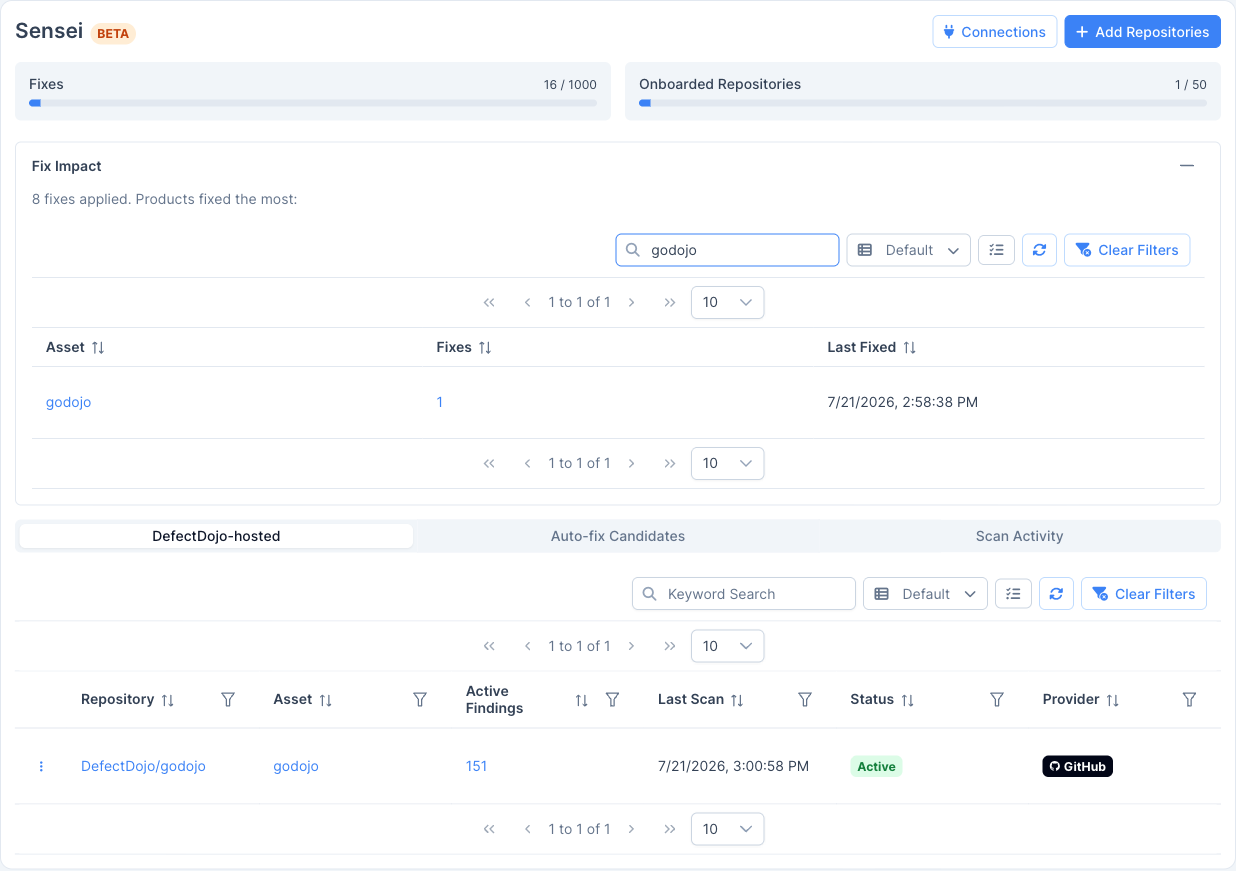
Sensei is metered against your license. The Sensei hub shows two usage meters at the top of the page:
- Fixes: the number of remediations applied against your prepaid limit. Approving a candidate or triggering a fix consumes from this quota.
- Onboarded Repositories: the number of repositories onboarded against your repository limit.
When a quota is reached, Sensei blocks further fixes (or onboarding) until it is raised. See Reference for details.