

Menu Badges (Pro)
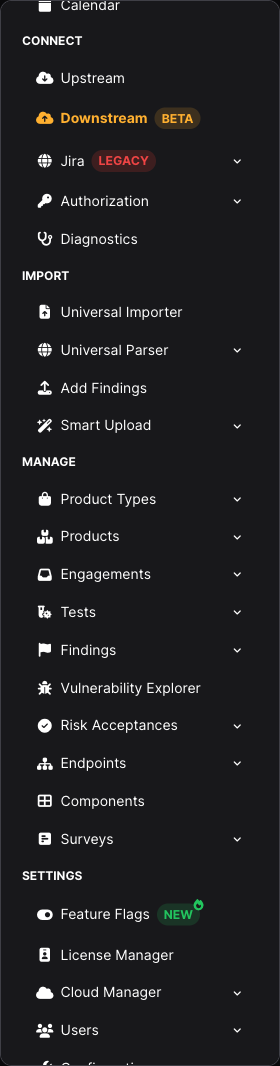
Entries in the DefectDojo Pro sidebar can carry a small coloured tag. Each one answers a different question about the feature it sits beside, and two of them are links.
| Badge | Colour | Means | What it asks of you |
|---|---|---|---|
SOON | Gold | Announced, not released yet | Nothing. The entry does not open a page |
NEW | Green | Recently released | Nothing. It is there so you notice the feature, and the sidebar’s What’s New panel lists every badged entry with the release’s highlights |
BETA | Brand-colored | Working, still being finished; behaviour may change between releases | Try it, and expect rough edges |
LOCKED | Grey | Not included in your license | Selecting the entry explains what unlocks it |
LEGACY | Red | Superseded by a newer feature, with no announced removal date | Prefer the replacement for new work |
DEPRECATED | Red | Scheduled for removal in a named release | Migrate before that release |
Two badges carry a small icon on their corner so they stay recognizable at a glance: NEW a flame, BETA a seedling. LOCKED carries a padlock inside the pill. When the sidebar is collapsed to its icon rail, those icons are what remains: they shrink to small marks on the row’s icon, in the badge’s colour, and hovering the row names the page and its badge together.
SOON marks a capability that has not shipped
A SOON entry is the only one that does not open a page. It is greyed out, and selecting it explains that the capability is on the way rather than navigating anywhere.
Nothing needs enabling and no license unlocks a SOON capability early. The badge is there so the roadmap is visible where you would look for the feature, instead of only in a release note. When the capability ships, the badge changes and the entry starts working.
LEGACY and DEPRECATED are not the same thing
The distinction is deliberate, because the two states call for different responses.
DEPRECATED means a removal has been announced. Hovering the badge tells you the release it goes away in, and clicking it opens the deprecation notice:
<Feature> is deprecated and will be removed by <release> (<month>). Click for the deprecation notice.
LEGACY means the feature has been superseded but no removal has been scheduled. There is deliberately no date in the hover text, because inventing one would be worse than saying nothing. Instead it names the replacement and links to its documentation:
<Feature> is superseded by <replacement> and will not receive new development. Click for its documentation.
A LEGACY feature keeps working and keeps getting fixes. It just will not gain new capability, so anything you build now is better built on the replacement.
Both badges are links, because a tooltip closes the moment your pointer leaves it and so cannot hold a clickable link. Clicking either badge opens its notice in a new tab; it does not navigate the menu entry underneath.
Pages of a deprecated feature carry a banner
Every page that belongs to a DEPRECATED feature opens with a warning banner. The banner carries the same red badge, names the release the feature goes away in, and says what to do. It reads the same announcement as the sidebar badge, so the two always agree.
What currently carries a badge
SOON
- Sensei + AI > CSPM is cloud security posture management, which is not available yet. See The Sidebar Menu.
LEGACY
- Connect > Jira — the original per-Asset Jira integration, superseded by the downstream connector for Jira. See Pro Integrations.
- Act > Triage Engine > Classic Rules is the original Rules Engine, superseded by Triage Engine. It carries the badge only on instances that have both engines turned on, since there is nothing to move to otherwise. See the conversion guide.
DEPRECATED
- Settings > Configuration > Tool Types and Tool Configurations, removed in 3.5.0 (November 2026) along with the API-based (pull) parsers they exist to configure. The 3.2 upgrade notes explain what to migrate to and by when.
- API Scan Configurations on an Asset, removed in 3.5.0 (November 2026) for the same reason.
- Endpoints (the Endpoints menu, the Endpoint and Host list pages, and a Finding’s endpoint tables), removed in 3.6.0 (December 2026) in favour of Locations. See Migrating from Endpoints.
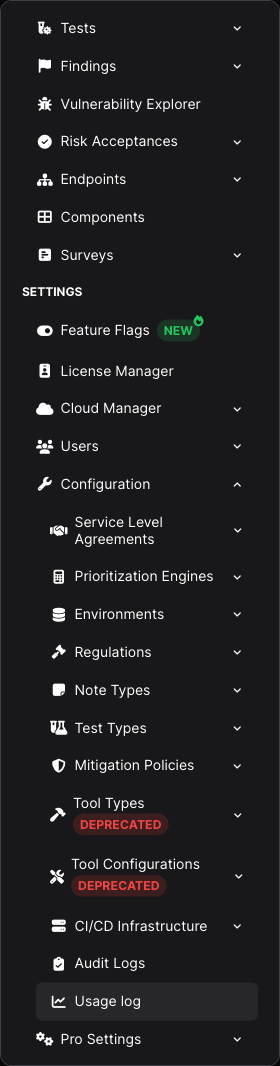
A label and its badge always share one line in the sidebar. Where the pair genuinely does not fit, it is the label that gives way (an ellipsis), never the badge dropping onto its own line; the full name still surfaces through the collapsed rail’s tooltips and on the page itself.
Related
- 3.2 upgrade notes — the current deprecations and their removal release
- Feature Flags — turning optional features, including beta ones, on and off