

Setting Up PAIN Ratings (Pro)
Potential Agency Impact (PAIN) Ratings explains what the rating is and how a deadline is derived from it. This page is the procedure: the order to do things in, what to check at each step, and what the deadline should read when you get there.
Work through it once, on one Asset, before you enable PAIN tiering across an authorization boundary. It takes about 45 minutes and ends with a remediation deadline you can trace to a single cell of FedRAMP’s published table.
Throughout, D is a finding’s discovery date. Expected results are written as D + n days, so
they hold whatever day you run this.
Before you start
| Requirement | Why | How to check |
|---|---|---|
| DefectDojo Pro 3.3.100 or later | Earlier versions carry the database field but offer no way to switch PAIN tiering on | Use PAIN Ratings for VDR Deadlines appears in the FedRAMP VDR & PAIN Tiering section of an SLA configuration |
Feature flag compliance | The Compliance tab, the POA&M ledger and the FedRAMP SLA presets | Feature Flags |
Feature flag rules_engine_v2 | Ratings are assigned by a rule; without it there is no Set Potential Agency Impact (PAIN) node | Feature Flags |
Feature flag threat_intel | exploit_maturity, which the shipped FedRAMP rule templates filter on | Feature Flags |
| Background task processing | Every SLA change recalculates asynchronously | On a self-hosted install, confirm the worker is running with your administrator |
| The FedRAMP VDR SLA configuration | It is the only preset carrying the tiers and the matrix | Configuration > Service Level Agreements |
| Permission to edit SLA configurations | Superuser, or the matching configuration permission | — |
Without a background worker, every step here saves successfully and no deadline ever moves, which looks exactly like the feature not working.
Read this before you turn anything on
Enabling PAIN tiering makes deadlines longer before it makes them shorter.
PAIN tiering replaces the three flat VDR tiers rather than combining with them. A finding that has no rating matches no cell of the matrix, so it falls back to its base severity SLA. On the FedRAMP VDR preset, a Critical finding that was sitting on the 4-day Urgent tier moves to 30 days the moment you tick the box, and stays there until somebody rates it.
That is correct behaviour, and it is the single most common reason people conclude the feature is broken. It is also why the walkthrough below has you record the deadline at three points rather than two.
Choose a finding to watch
Which column of the matrix a finding lands in depends on whether DefectDojo considers it likely exploitable, which is read from two fields:
known_exploited— is it in the CISA KEV catalog?epss_score— is EPSS at or above the configuration’s threshold,0.1by default?
For the clearest demonstration, pick a finding in the tightest column: Critical severity,
KEV-listed, and tagged internet-reachable. A Log4Shell finding (CVE-2021-44228) from any scan
import is the canonical example.
In normal operation both fields arrive from your scanners or from Finding Enrichment rather than being entered by hand. If your imported findings have both empty, turn enrichment on at Settings > Finding Enrichment Settings and enable KEV Lookup and EPSS Lookup — on DefectDojo Cloud these are already on. With no lookup source configured, enrichment silently enriches nothing.
Confirm the finding you picked actually carries them before predicting a deadline from it. A finding with neither is not likely exploitable, so it lands in the widest column of the matrix: the mechanism still works, but the only movement you will see is 30 days to 16 at N5, which is a much weaker check. On a test instance an administrator can set them directly:
curl -X PATCH "$DD_URL/api/v2/findings/<FINDING_ID>/" \
  -H "Authorization: Token $DD_TOKEN" -H "Content-Type: application/json" \
  -d '{"known_exploited": true, "epss_score": 0.9744, "epss_percentile": 0.9997}'
The deadline recalculates on save. Note the finding’s Finding ID from its URL and its Date Discovered — that date is D.
Step 1 — Put the Asset on FedRAMP VDR
Open the Asset, choose Edit, and set SLA Configuration to FedRAMP VDR.
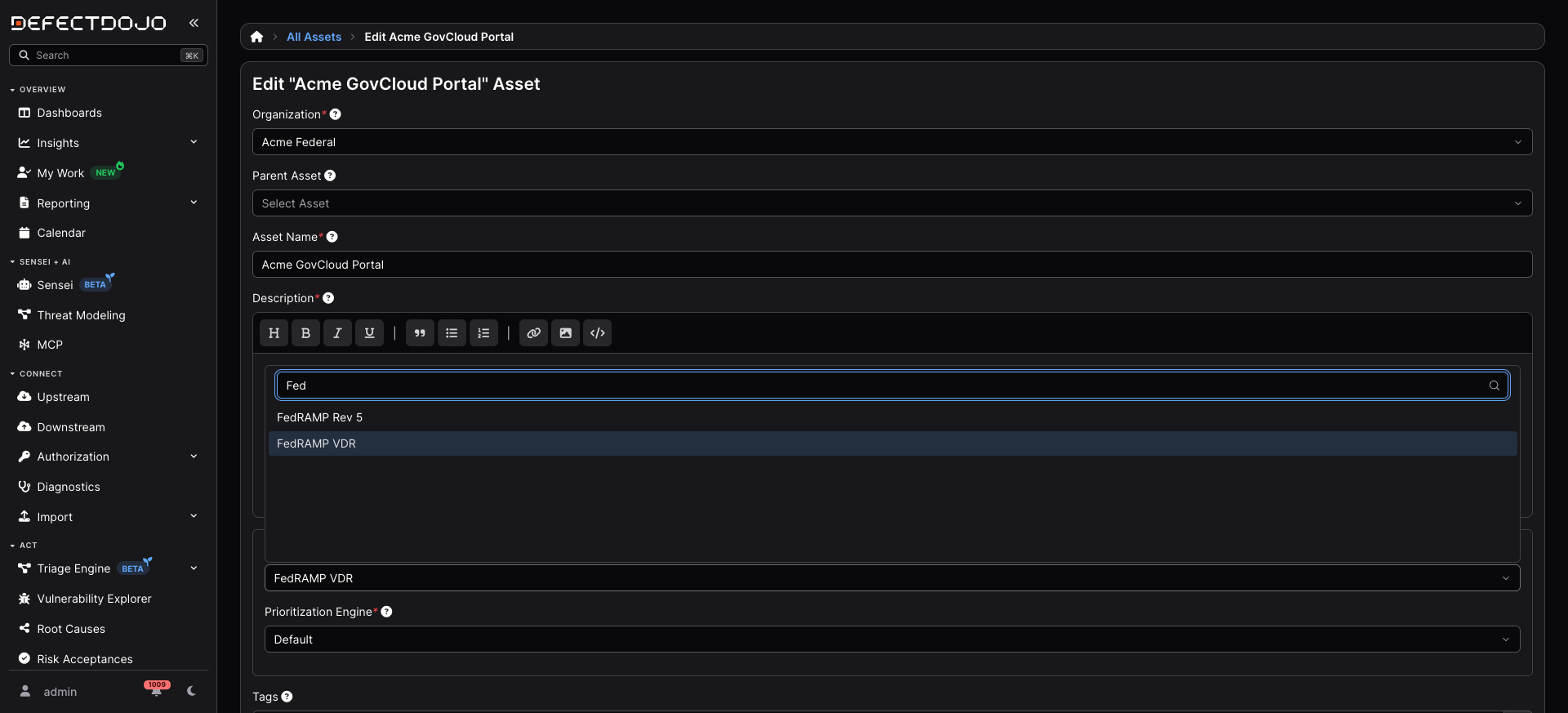
Only FedRAMP VDR carries the exploitability tiers and the PAIN matrix. FedRAMP Rev 5 gives you the 30/90/180 base windows and the CISA KEV cap, but no tiering at all.
Changing an Asset’s SLA configuration recalculates every finding on it, and the Asset’s SLA cannot be changed again while that runs — see SLA Recalculation.
Then open Configuration > Service Level Agreements, edit FedRAMP VDR, and confirm it reads:
| Field | Expected |
|---|---|
| Critical / High / Medium / Low Finding Days | 30 / 30 / 90 / 180 |
| Enforce … Finding Days (all four) | ticked |
| Cap SLA by CISA KEV Due Date | ticked |
| Enable VDR Deadlines | ticked |
| VDR Urgent Days | 4 |
| VDR Credibly-Exploitable Days | 14 |
| VDR Internet-Reachable Days | 30 |
| VDR EPSS Threshold | 0.1 |
| VDR Reachability Tag | internet-reachable |
| Use PAIN Ratings for VDR Deadlines | unticked, for now |
Enable VDR Deadlines must be ticked. The matrix is applied inside the VDR calculation, so with VDR off no cell is ever consulted and the PAIN checkbox does nothing at all.
If this configuration is already assigned to Assets outside the boundary you are working in, copy it first and point only your test Asset at the copy. Enabling PAIN tiering re-dates every finding on every Asset using the configuration.
Step 2 — Record the deadline before tiering
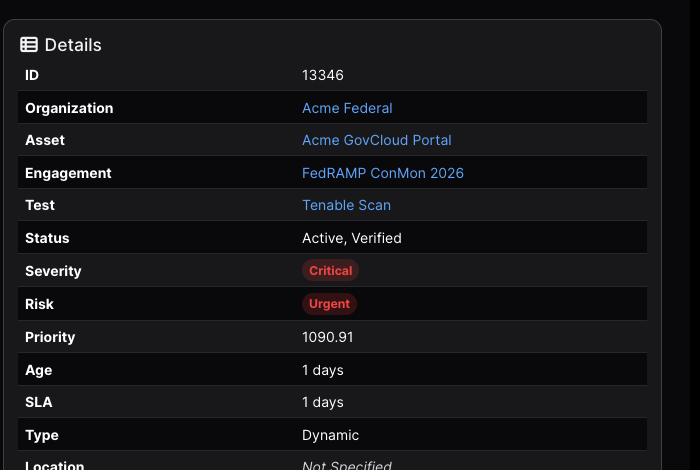
Open your chosen finding and read the SLA row in the Details panel.
| Expected | Why |
|---|---|
| D + 4 days | The base SLA for a Critical is 30 days, but the finding is likely exploitable and internet-reachable, so the flat VDR Urgent tier of 4 days applies. VDR only ever tightens, so 4 wins. |
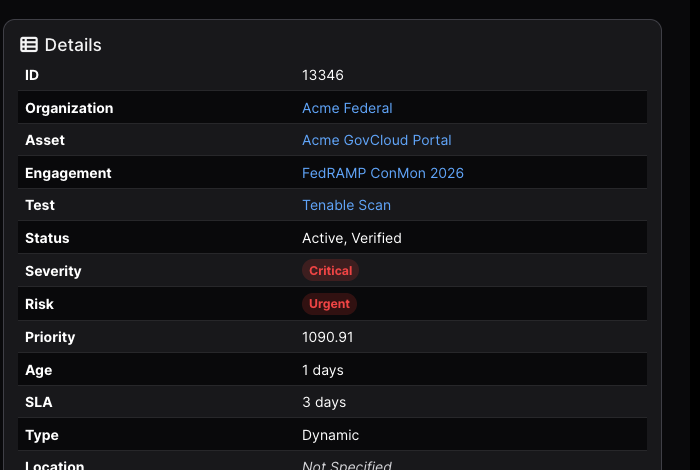
The panel above was captured the day after discovery, so SLA reads the days remaining rather than the window itself.
| If you see | Cause |
|---|---|
| D + 30 | The finding is not seen as exploitable or reachable. Check that Known Exploited is ticked, or EPSS is above the threshold, and that the tag reads exactly internet-reachable |
| Some other number | The Asset is still on a different SLA configuration. Repeat Step 1 |
Step 3 — Turn on PAIN tiering
Edit FedRAMP VDR again, scroll to FedRAMP VDR & PAIN Tiering, and tick Use PAIN Ratings for VDR Deadlines. The twelve-cell matrix appears immediately, pre-seeded with FedRAMP’s published Class C values.
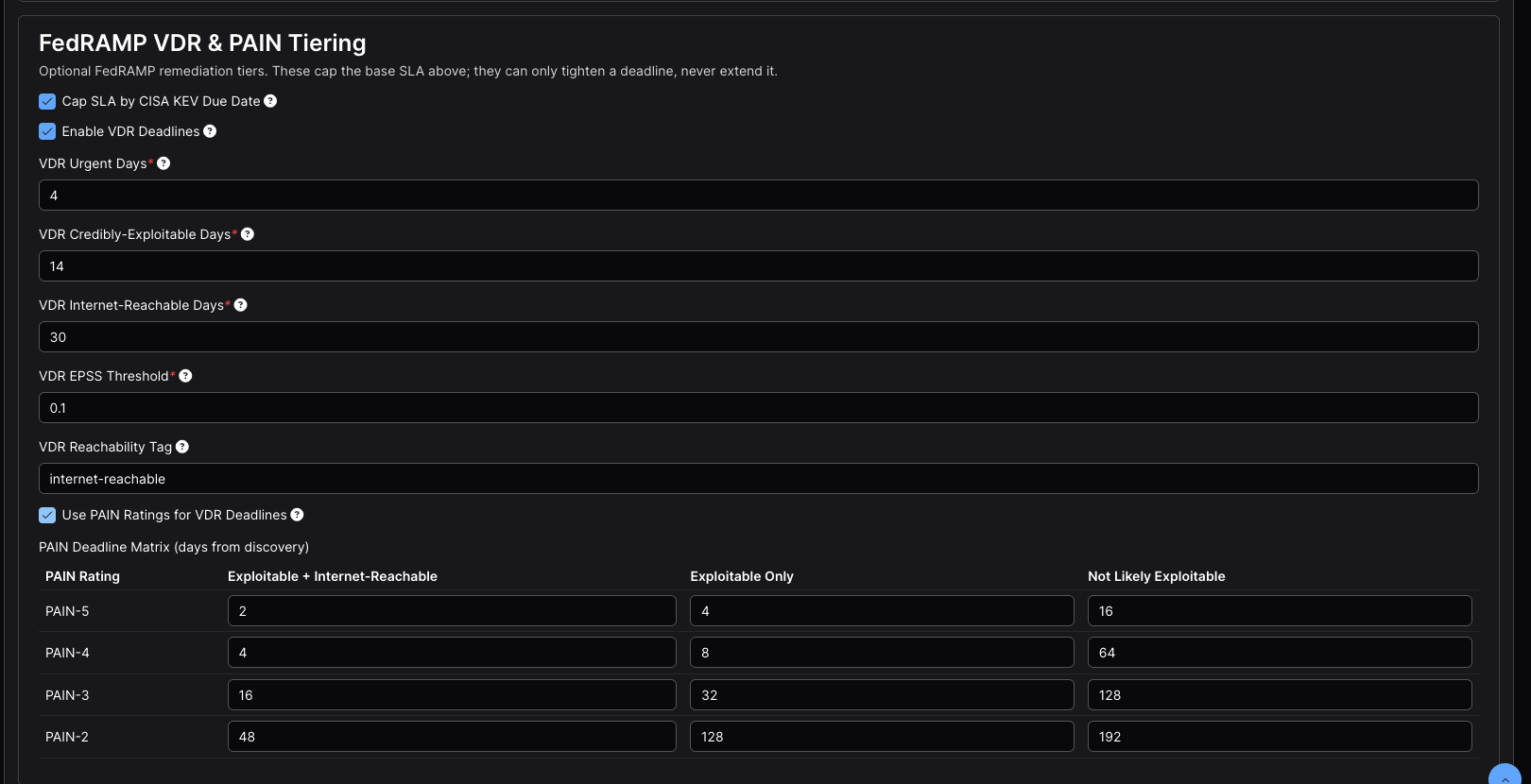
| PAIN Rating | Exploitable + Internet-Reachable | Exploitable Only | Not Likely Exploitable |
|---|---|---|---|
| PAIN-5 | 2 | 4 | 16 |
| PAIN-4 | 4 | 8 | 64 |
| PAIN-3 | 16 | 32 | 128 |
| PAIN-2 | 48 | 128 | 192 |
There is deliberately no PAIN-1 row: FedRAMP’s table starts at N2, so an N1 finding carries no VDR deadline and keeps its base window.
Submit. This queues a recalculation across every finding on every Asset using the configuration — seconds on one Asset, proportionally longer on a large boundary. While that sweep runs the configuration is locked, and further saves are silently reverted rather than rejected. If a matrix cell snaps back to its old value, that is why: wait for the sweep to finish and edit it again.
When it completes, reload the finding.
| Expected | Why |
|---|---|
| D + 30 days | The finding has no PAIN rating, so no matrix cell applies and it falls back to the base severity SLA |
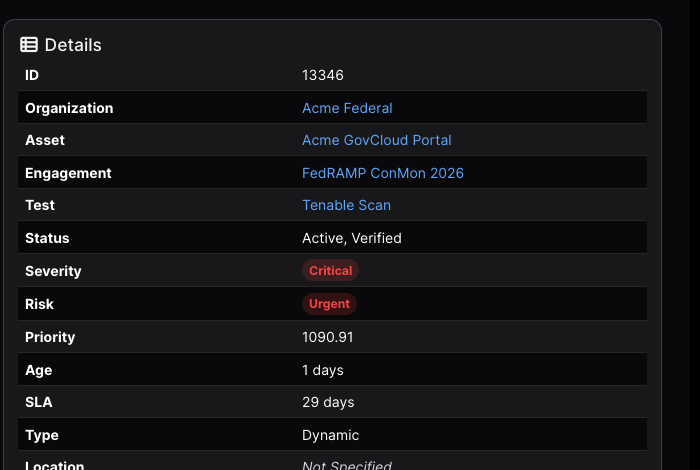
The deadline has moved outwards, from 4 days to 30. This is the step described at the top of the page. Nothing is wrong — continue.
Step 4 — Assign a rating
PAIN is a judgment about the effect exploitation would have on your agency customers. DefectDojo never derives one. A person can rate a single finding by hand on its edit form (see Rating findings by hand), which is the quickest way to watch one deadline move. This walkthrough uses a Triage Engine rule instead, because a rule is how ratings are applied across a boundary.
Go to Act > Triage Engine > Rules, choose New Rule, and wire three nodes left to right:
| Order | Palette section | Node | Configuration |
|---|---|---|---|
| 1 | Triggers | Manual Run | Sweep Over: Findings. Leave scope empty. |
| 2 | Logic | If / Filter | One condition: finding.id equals your Finding ID. Match: All of Them. |
| 3 | Findings | Set Potential Agency Impact (PAIN) | N5 — debilitating effect on more than one agency |
Connect Manual Run to If / Filter, then drag from the filter’s true output to the PAIN
node. Filtering on a single finding.id is the most legible thing to put on screen for a first run;
a production rule filters on severity, exploit evidence and finding.pain_rating is not set
instead.
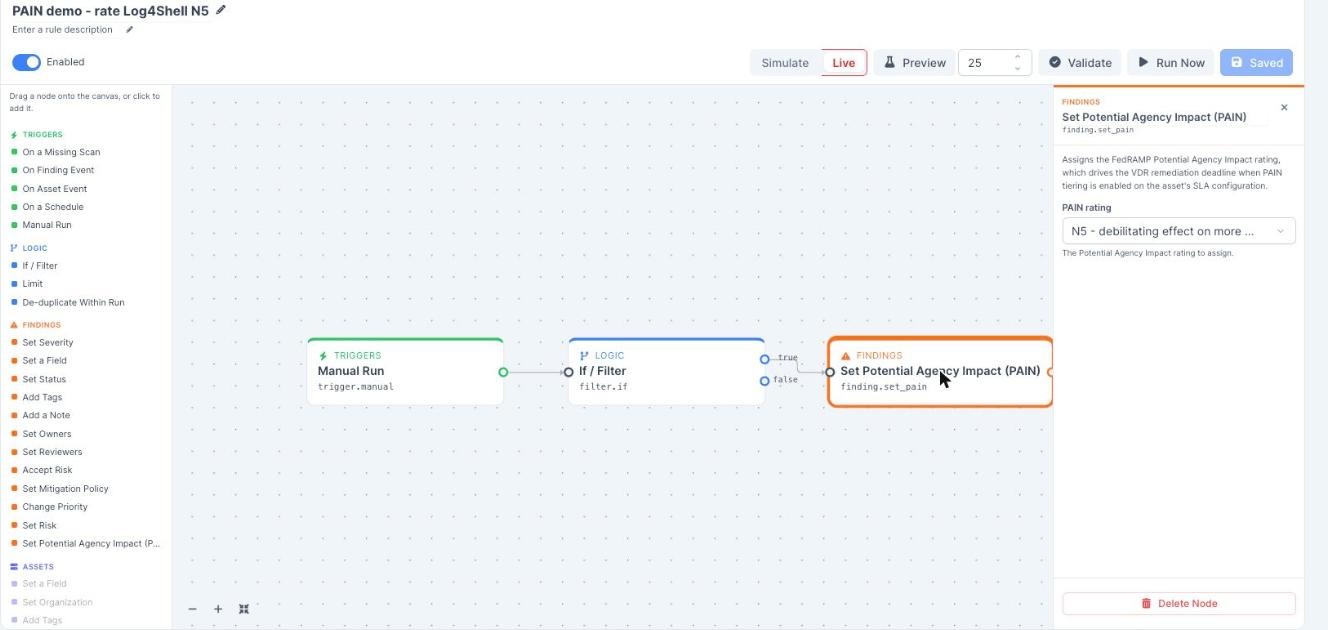
Simulate mode will not protect your findings. Simulate holds back outbound sends only — alerts, tickets, messages and webhooks. Every Finding edit in a graph happens for real in simulate mode, and that includes this one. See Mode: Simulate or Live.
That matters here because the rule action offers only N1 to N5: a rule cannot return a finding to unrated. Undoing a wrong rating is a manual step, either clearing the field on Edit Finding or choosing Unrated in Bulk Edit. Treat any rule containing Set Potential Agency Impact (PAIN) as live from the moment you press Run Now, and check the filter value before you do.
Preview is the safe check for a broad rule — it runs the real engine inside a transaction it then rolls back, writing nothing. It will not help you here, though: preview caps how many items it looks at, so a rule targeting one specific finding usually comes back empty. For a single-finding rule, click Validate to confirm the graph is well-formed, then re-open the If / Filter node and read the Finding ID back.
Set the mode to Live, toggle Enabled on, Save, then Run Now. A rule must be both saved and enabled first: Run Now is greyed out while there are unsaved changes, and a disabled rule records no run.
Open Act > Triage Engine > Runs and expand the newest run:
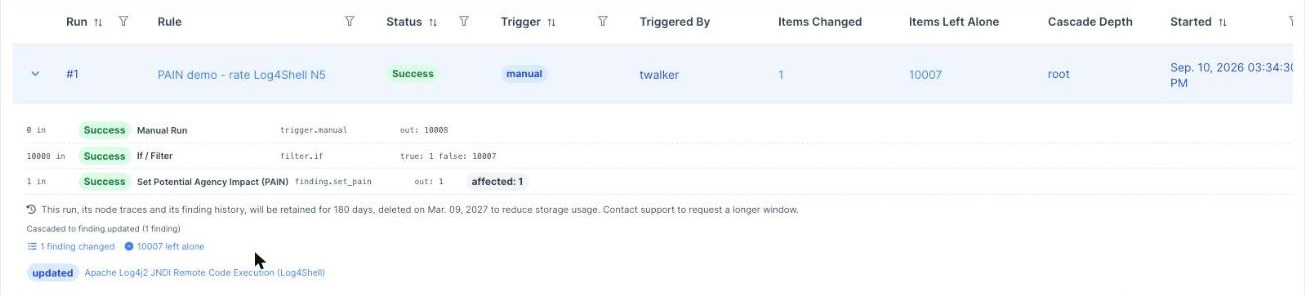
The trace records each node’s input and output counts, and Show Changes lists the finding that was updated. Reload the finding:
| Expected | Why |
|---|---|
| D + 2 days | Rated N5, still exploitable and reachable — the matrix cell at N5 × (LEV + IRV) |
| Date Discovered still D | Unchanged. Only the rating moved |
Step 5 — Walk the matrix
Optional, and worth doing once. Edit the rule’s PAIN node, change the rating, Save, Run Now, and reload the finding.
| Rating | Cell | Expected deadline | What it shows |
|---|---|---|---|
| N5 | 2 days | D + 2 | The tightest tier |
| N4 | 4 days | D + 4 | The same window the rating-agnostic Urgent tier gave |
| N3 | 16 days | D + 16 | The middle of the table |
| N2 | 48 days | D + 30 | The base SLA is shorter, so it wins |
The N2 row is the one to show an assessor. Its cell is 48 days, but the finding still gets 30, because VDR and PAIN tiering can only ever tighten a deadline, never extend one.
Re-running at a rating the finding already holds reports nothing affected. That is deliberate: it stops a scheduled rule re-stamping PAIN Evaluated on a finding whose impact has not been reassessed.
What this proves
One finding, one discovery date, three deadlines — each the product of a configuration change and nothing else.
| Stage | Deadline | Set by |
|---|---|---|
| FedRAMP VDR assigned, PAIN tiering off | D + 4 | The flat VDR Urgent tier, which beats the 30-day base |
| PAIN tiering on, finding unrated | D + 30 | The base severity SLA — no matrix cell applies |
| Rated N5 | D + 2 | The matrix cell at N5 × (LEV + IRV) |
The severity never changed and no date was typed in by hand. Each deadline was derived from the finding’s exploitability, its reachability, and the impact rating a person assigned.
Moving to a production workflow
A rule filtering on one finding.id proves the mechanism. Running a boundary needs two more things:
a queue of findings waiting for an impact decision, and an escalation path for the ratings that
warrant one. Both ship as templates — see
FedRAMP rule templates for what each one does, and
Building Rules for how adoption works.
An adopted template arrives disabled and in simulate mode. Before it will do anything:
| Setting | What to do |
|---|---|
| Schedule | Select the On a Schedule trigger and set a cadence. A scheduled rule with no schedule never runs, and this is the most common reason an adopted template appears dead |
| Recipients | On the alert node, name the users who own impact decisions. Left empty it alerts administrators |
| Scope | On the trigger, narrow to the Assets inside your authorization boundary. Left empty, the rule considers every finding its owner can see |
| Enabled | Toggle it on and save |
Why a newly adopted template is quiet at first
Both PAIN templates filter on finding.exploit_maturity, and that field is worth understanding
before you conclude the rule is broken.
| Condition | Source |
|---|---|
finding.active equals true | The finding’s own status |
finding.pain_rating is not set | Unrated — what the rule is looking for |
finding.exploit_maturity >= Weaponized | Threat intelligence, not the finding record |
exploit_maturity is not known_exploited. It is derived from DefectDojo’s threat intelligence
by matching a finding’s CVEs, and written onto findings by a scheduled backfill. It is read-only
through the API, so nothing you set on a finding populates it.
The consequence is that findings imported today will not match these templates today, even when their CVEs, KEV flags and EPSS scores are all correct — only the backfill has not reached them yet. Configure the rule, let it sit, and check the runs over the following days.
You can watch that coverage arrive rather than guessing at it. On the findings list, add the Exploit Maturity column, or filter on it, to see which findings the backfill has reached. Once the findings you care about show Weaponized or higher, the template has something to match.
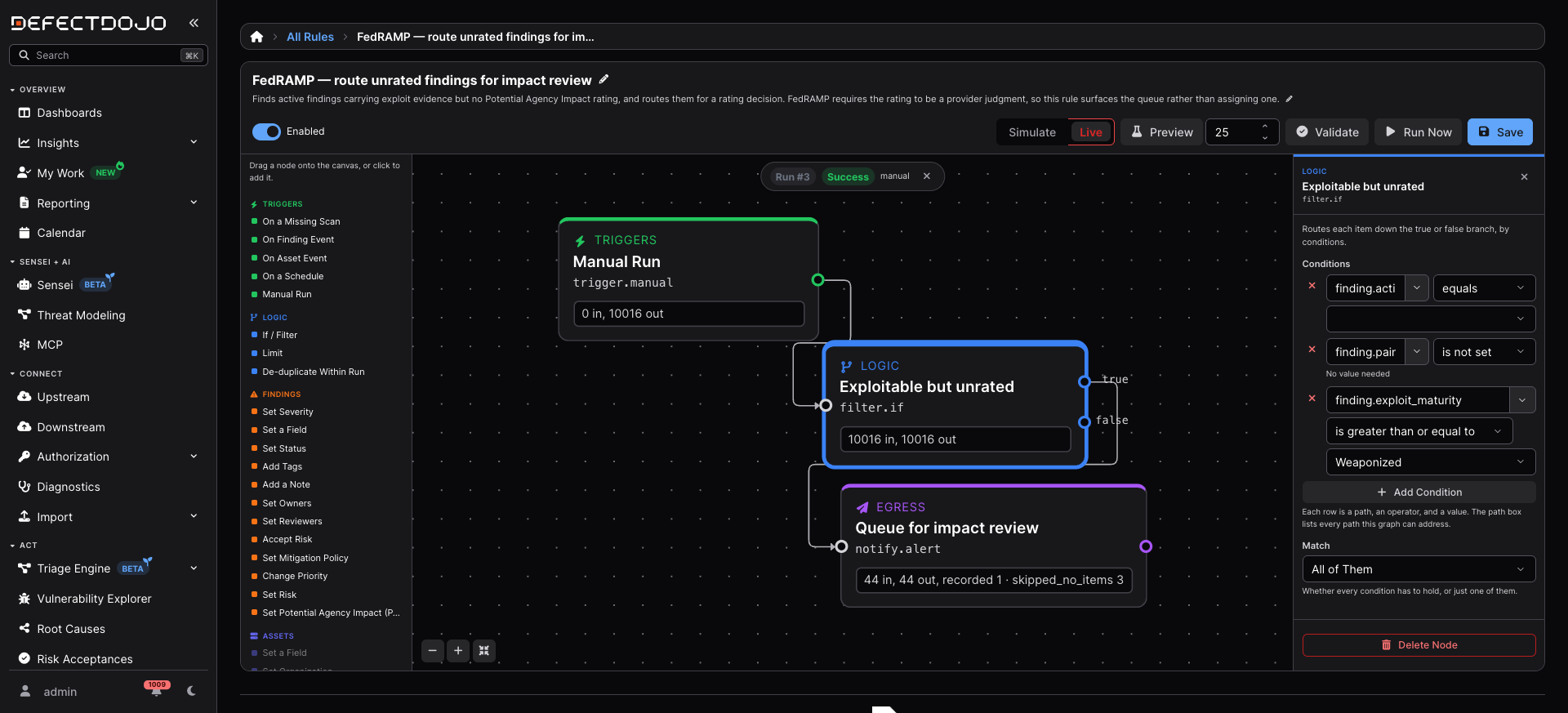
One display quirk to expect on an adopted template: the value box on the finding.active condition
renders empty, because the template stores that value as text and the dropdown offers booleans. The
comparison is type-tolerant and the rule evaluates correctly either way, so you can leave it or
select true.
Rate before the first POA&M sync
Each POA&M item takes its Scheduled Completion Date from the evidencing finding’s enforced deadline at the moment the item is created, and keeps that date afterwards. This is deliberate — a commitment an assessor has already read should not silently move — but it means that if the ledger was synced before you started rating, the Compliance tab still shows the pre-PAIN dates and it will look as though nothing happened.
Rate your findings before the first sync. If items already exist, delete them and re-sync from the Asset’s Compliance tab. See The POA&M Ledger.
Troubleshooting
| Symptom | Cause | Fix |
|---|---|---|
| No Use PAIN Ratings for VDR Deadlines checkbox | Version earlier than 3.3.100 | Upgrade |
| Ticking the box changes nothing | Enable VDR Deadlines is off | Tick it — the matrix is applied inside the VDR calculation |
| No deadline moves after submitting | Background task processing is not running | Check with your administrator |
| A matrix cell snaps back after editing | The recalculation sweep is still running and the configuration is locked | Wait for it to finish, then edit again |
| The deadline got longer after enabling PAIN | Expected — the finding is unrated | Assign a rating (Step 4) |
| Baseline is D + 30 instead of D + 4 | The finding is not KEV-listed, EPSS is below threshold, or the tag is missing or misspelled | Check Known Exploited, EPSS, and that the tag matches the configuration’s reachability tag exactly |
| Known Exploited and EPSS empty on imported findings | No enrichment lookup sources configured | Settings > Finding Enrichment Settings |
| An adopted template matches nothing | exploit_maturity has not been backfilled onto those findings | Expected on recent imports — give the backfill time |
| An adopted template never runs at all | It has no schedule, or it is disabled | Both are required |
| A rule reports nothing affected | The finding already holds that rating | Expected — choose a different rating |
| Run Now does nothing and no run appears | The rule is disabled | Enable it, save, then run |
| A simulate run rated the finding anyway | Simulate holds back outbound sends only, not Finding edits | Expected — treat any rule with a PAIN node as live |
| A rated finding cannot be returned to unrated by a rule | The rule action offers N1 to N5 only | Clear the rating on Edit Finding, or choose Unrated in Bulk Edit |
| No PAIN field on Edit Finding | Your role lacks Rate Potential Agency Impact (PAIN) | Ask an administrator for a role that carries it |
| The POA&M date did not change | It was frozen when the item was created | Delete the items and re-sync after rating |
What is not surfaced today
So nobody spends time hunting for these:
exploit_maturityis absent from the finding REST API, though it is visible in the product: add the Exploit Maturity column to the findings list, or filter on it, to see which findings the backfill has reached.
The rating itself is surfaced everywhere from 3.5.0: on the finding’s Details panel, as a findings
list column and filter, and as pain_rating on /api/v2/findings/. See
Rating findings by hand.
None of these affect whether deadlines are computed correctly, which is what this page checks.