

Potential Agency Impact (PAIN) Ratings (Pro)
FedRAMP’s Vulnerability Detection and Response standard does not set one deadline per severity. It sets a deadline per combination of how exploitable a vulnerability is, whether it is reachable from the internet, and how much damage its exploitation would do to the agencies using your service. That third factor is the Potential Agency Impact N-rating, or PAIN.
This page covers the rating, how it changes a deadline, and how to assign ratings at scale. For the SLA presets that carry the matrix, see Remediation Deadlines. To switch it on and check the result step by step, see Setting Up PAIN Ratings.
The N-rating scale
| Rating | What it means |
|---|---|
| N5 | Debilitating effect on more than one agency |
| N4 | Debilitating on one agency, or disruptive on several |
| N3 | Disruptive effect on one agency |
| N2 | Narrow customer effect |
| N1 | Minimal customer effect |
PAIN is deliberately a person’s judgment rather than a scanner output. FedRAMP asks the provider to estimate the effect exploitation would have on its agency customers, and declines to prescribe a method for arriving at the number. DefectDojo records the rating and a PAIN Evaluated timestamp saying when it was last set, but never derives a rating for you.
A finding with no rating is unrated, and an unrated finding keeps its base deadline.
FedRAMP’s mitigation timeframes
Class C is the certification tier that replaced the Moderate baseline. Its mitigation and remediation rule, VDR-TFR-PVR, asks you to partially mitigate, fully mitigate, or remediate each vulnerability to a lower N-rating within these timeframes:
| PAIN rating | Likely exploitable and internet-reachable (LEV + IRV) | Likely exploitable, not internet-reachable (LEV + NIRV) | Not likely exploitable (NLEV) |
|---|---|---|---|
| N5 | 2 days | 4 days | 16 days |
| N4 | 4 days | 8 days | 64 days |
| N3 | 16 days | 32 days | 128 days |
| N2 | 48 days | 128 days | 192 days |
Two things about the shape of the table:
- The third column ignores reachability. NLEV means not likely exploitable, whether or not the finding is internet-reachable. It is wider than the reachable-only tier in the three-tier VDR model.
- There is no N1 row. FedRAMP’s table starts at N2, so a finding rated N1 carries no VDR deadline and keeps its base window. DefectDojo does not invent a row FedRAMP has not published.
Every cell is editable. The shipped numbers are FedRAMP’s published Class C values; a provider holding a Class B or Class D certification changes the numbers, not the shape.
When this applies
| Milestone | Date |
|---|---|
| Optional adoption of the VDR standard opens | July 4, 2026 |
| Required to obtain and maintain, mandated by CISA BOD 26-04 | December 7, 2026 |
| Grace period ends | March 7, 2027 |
How a deadline is calculated
Two FedRAMP SLA configurations ship with DefectDojo Pro. FedRAMP VDR is the one that carries the matrix.
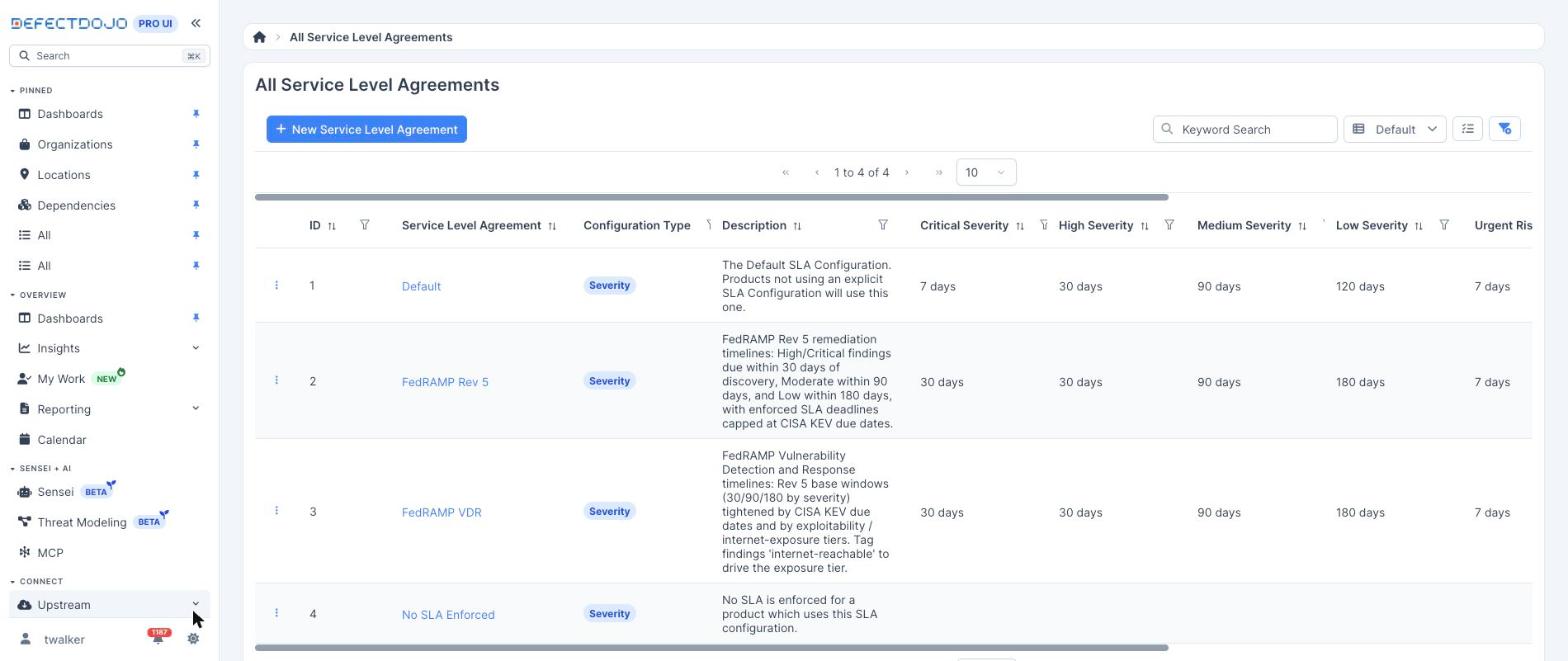
Assign it to the Assets inside your authorization boundary, then turn on Use PAIN Ratings for VDR Deadlines.
For each finding on an Asset using that configuration, the deadline is computed in three steps:
- Base SLA. The window for the finding’s severity, or its risk band when the configuration is risk-based — 30, 90 or 180 days.
- KEV cap. A finding in the CISA KEV catalog is never scheduled past CISA’s due date.
- VDR cap. Exploitability (KEV-listed, or an EPSS score at or above your threshold,
0.1by default) and reachability (theinternet-reachabletag, and optionally the computed asset exposure verdict) select a column. The finding’s PAIN rating selects a row. The matching cell caps the deadline.
Two invariants are worth knowing before you turn this on:
- VDR only ever tightens a deadline. DefectDojo takes the shorter of the base SLA and the matrix cell, so enabling the matrix can never push a date out.
- PAIN tiering replaces the flat tiers rather than blending with them. Without ratings, FedRAMP VDR uses three flat tiers of 4, 14 and 30 days. With PAIN tiering on, those tiers are gone: an N2 finding gets its N2 cell, never the rating-agnostic 4-day tier it is not entitled to.
Deadlines are computed from the finding’s SLA start date (its discovery date), and the PAIN Evaluated timestamp is kept alongside for reporting on when each impact decision was made.
A worked example
The Log4Shell finding below (CVE-2021-44228) is Critical, listed in the CISA KEV catalog, and tagged
internet-reachable. It sits on a FedRAMP Moderate Asset using the FedRAMP VDR configuration, and
was discovered on September 9, 2026, so its base SLA is 30 days from discovery. The screenshots were
captured the following day.
| State | Matrix cell | Deadline written to the finding |
|---|---|---|
| PAIN tiering off, flat VDR tiers | Urgent, 4 days | September 13 — 3 days remaining |
| PAIN tiering on, finding not yet rated | none | October 9 — the base SLA, 29 days remaining |
| Rated N5 | 2 days | September 11 — 1 day remaining |
| Rated N4, for comparison | 4 days | 4 days from discovery |
| Rated N3, for comparison | 16 days | 16 days from discovery |
| Rated N2, for comparison | 48 days | 30 days — the base SLA is shorter, so it wins |
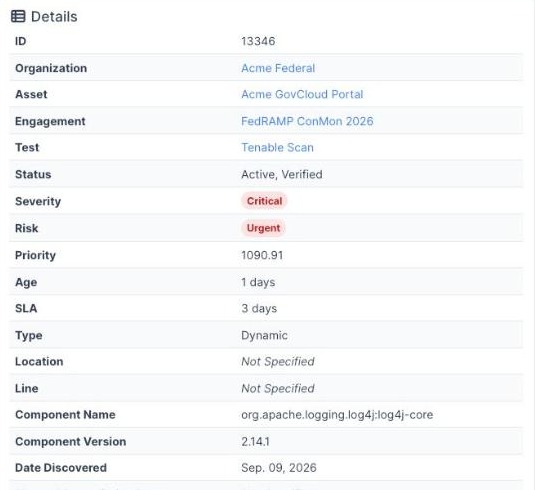
Before rating: the flat VDR urgent tier gives this KEV-listed, internet-reachable finding a four-day deadline, three days remaining on the day of capture.
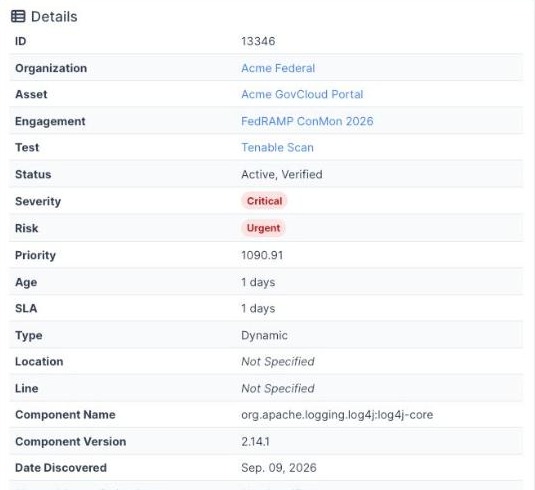
After rating: with PAIN tiering on and the finding rated N5, the deadline moves to the matrix’s two-day cell. Nothing else about the finding changed.
Rating findings by hand
From 3.5.0 a person can set, change or clear a rating directly, which is how a reviewer confirms or overrides what a rule proposed:
| Where | How |
|---|---|
| One finding | Edit Finding, then Optional Fields > Risk and Priority Settings > Potential Agency Impact (PAIN). Clear the field to return the finding to unrated. |
| Many findings | Select them on a findings list and open Bulk Edit. Choose a rating, or Unrated to clear it. Leaving the field empty leaves every rating as it is. |
| The API | pain_rating on /api/v2/findings/: send 1 to 5 to set it, null to clear it. It is accepted on create too, so an importer can set a default rating. pain_evaluated_at is read-only. |
Setting a rating needs the Rate Potential Agency Impact (PAIN) permission, which is separate from editing the finding. Every built-in role that can edit findings carries it, and on upgrade so does every custom role that can, so nothing changes until an administrator decides otherwise. Built-in roles cannot be edited, so to keep ratings with fewer people, create a custom role under Settings > Users & Permissions > Roles with the finding permissions your reviewers need and without Rate Potential Agency Impact (PAIN), and assign it in place of the built-in one. A user without the permission can still edit the finding; the rating field is hidden on the form, and a bulk edit skips the findings they may not rate and says so.
A hand-set rating behaves exactly like a rule-set one:
- A change stamps PAIN Evaluated, and clearing the rating clears it too.
- Saving the same rating again changes nothing, so resubmitting a form never moves the deadline.
- The deadline is recalculated on the same save.
- Every change is recorded in the finding’s history with the user who made it.
The rating shows on the finding’s Details panel as, for example, N4 (evaluated Oct. 28, 2026). On
the findings list, add the PAIN column, or filter on it. The filter accepts Unrated, which
is the queue of findings waiting for an impact decision. Through the API the same filter is
?pain_rating=unrated or ?pain_rating=4,5.
Rating findings with the Rules Engine
Ratings can also be assigned through Triage Engine, which is the way to rate findings at scale. The Set Potential Agency Impact (PAIN) action writes a rating to every finding that reaches it. Rules are governed by the rule permissions, not by the rating permission above.
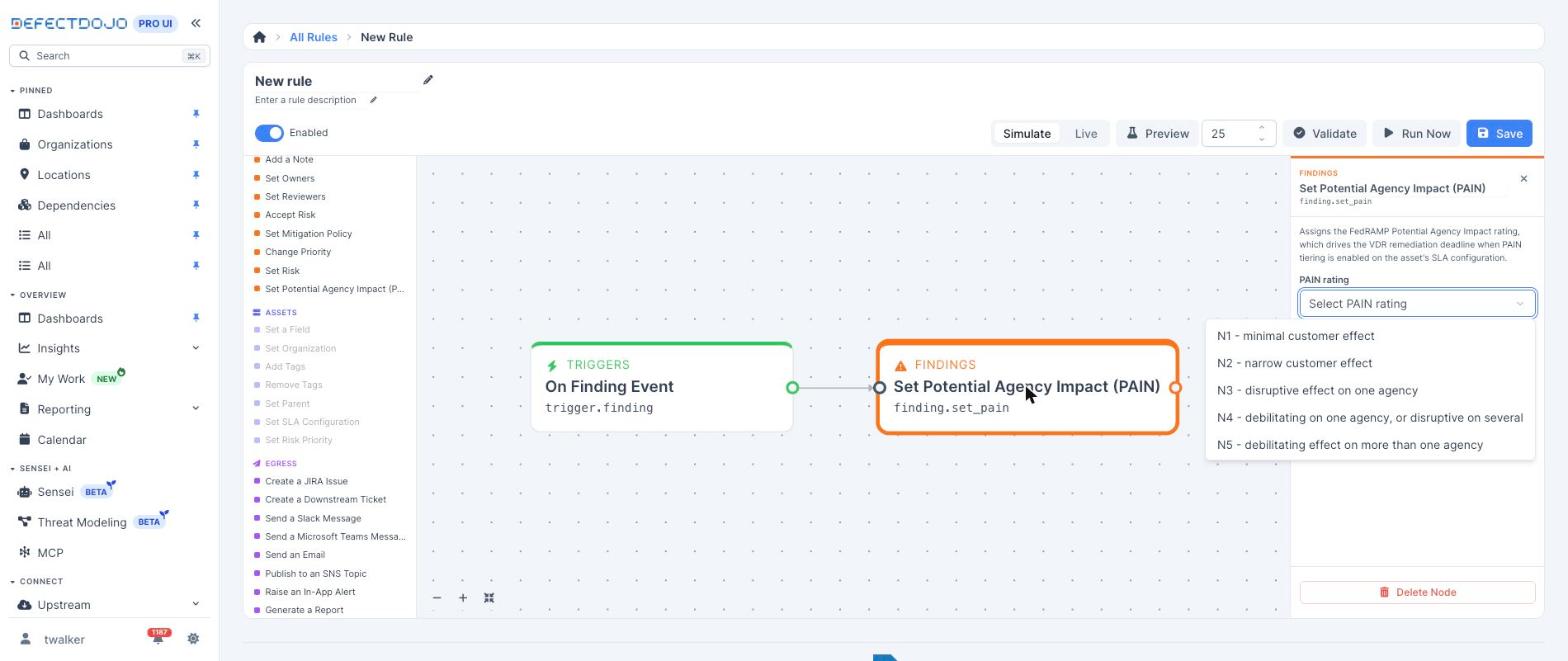
The rating selector offers FedRAMP’s own customer-effect wording rather than bare numbers, so whoever builds the rule sees the judgment being made.
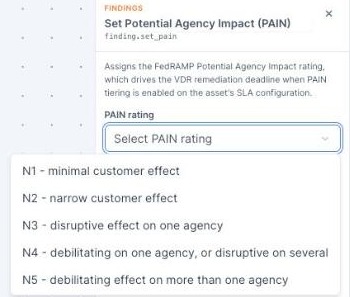
The action behaves the way a compliance workflow needs it to:
- It writes the rating and stamps PAIN Evaluated in the same operation.
- It skips findings already at the selected rating, so a scheduled rule never re-stamps the evaluation time on a finding that has not changed.
- Saving the finding recalculates its SLA deadline through the same path every other deadline uses, so a rule-set rating and a hand-set one produce the same date.
- A rating outside 1 to 5 is rejected.
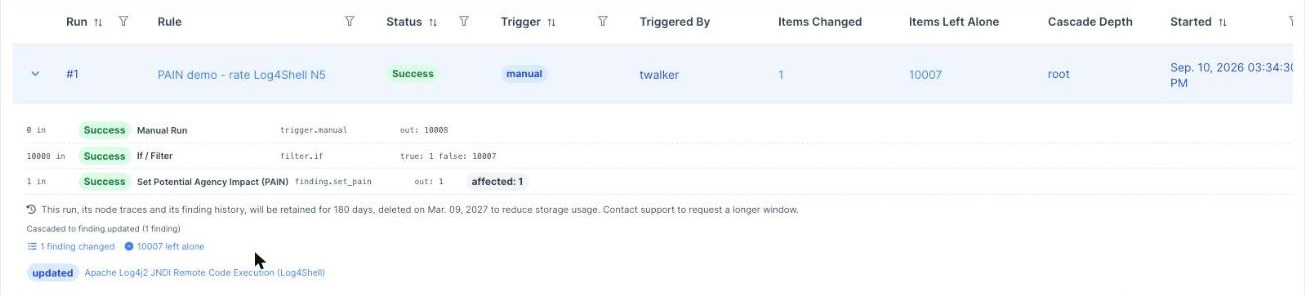
- Every run records a per-finding trace of the change, from and to — the audit trail for each impact decision. See Runs.
finding.pain_rating is also available as a condition in any filter node, which is what makes
escalation rules such as “above N3 and internet-reachable” possible.
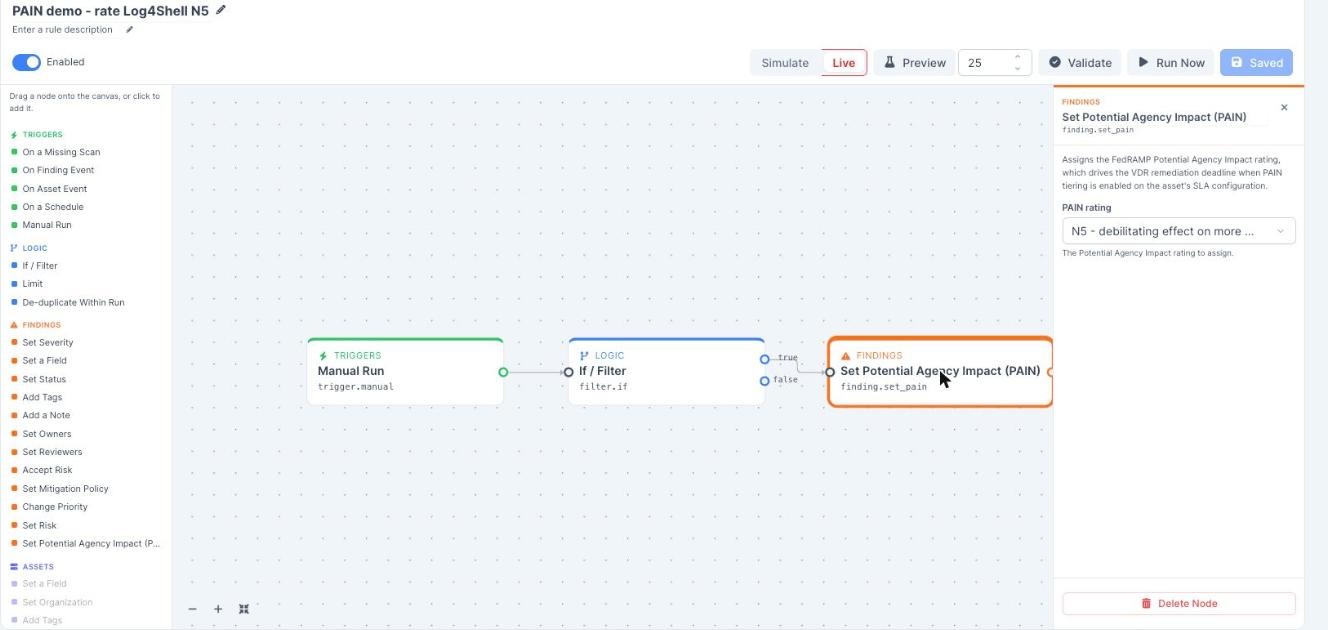
The rule below produced the deadline change above: a Manual Run trigger, an If / Filter node selecting the finding, and Set Potential Agency Impact (PAIN) set to N5, switched to Live.
The run trace records each node’s input and output counts. This run swept 10,008 findings, one matched the filter, and one rating was written.
FedRAMP rule templates
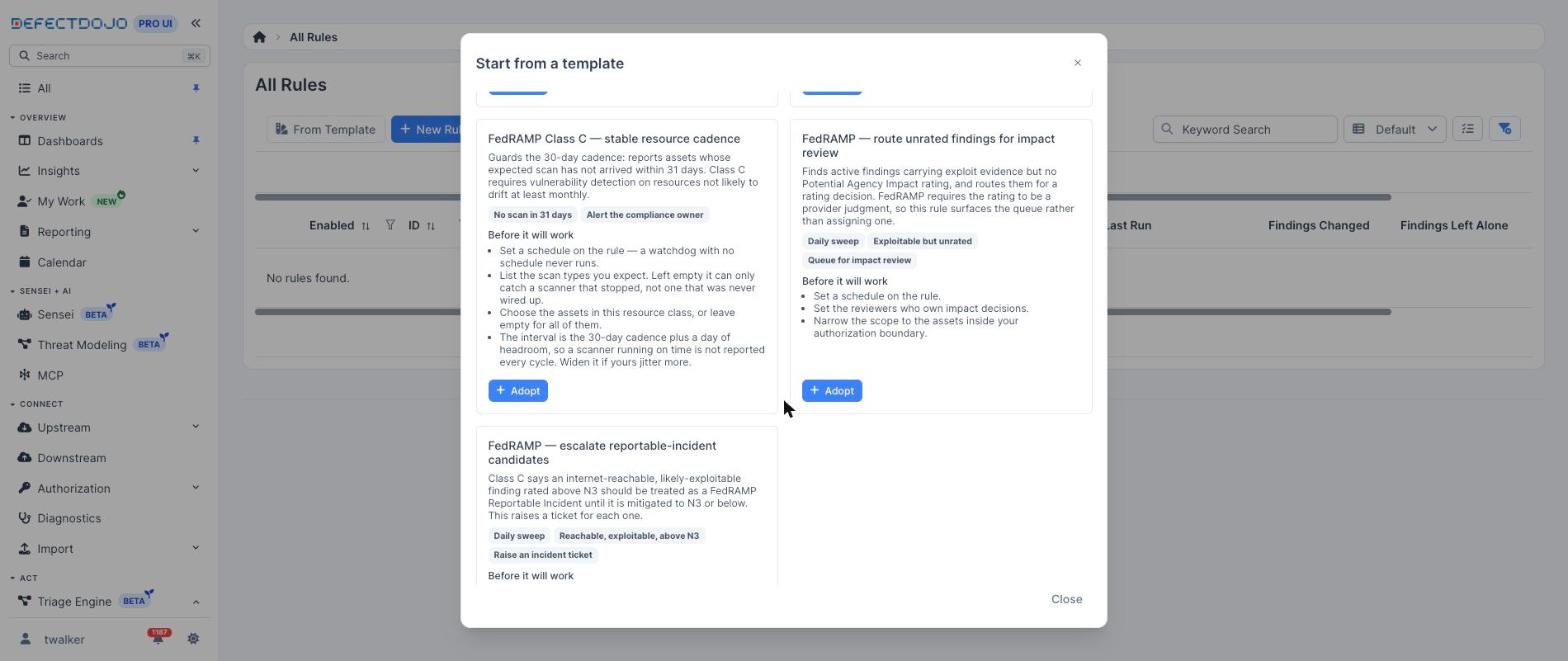
Two templates covering the PAIN workflow ship in the template gallery, alongside three Class C scan-cadence watchdogs. Adopting a template creates a new rule of your own, disabled and in simulate mode, so nothing runs on its own until you configure and enable it.
| Template | What it does |
|---|---|
| FedRAMP: route unrated findings for impact review | A scheduled sweep for active findings that carry exploit evidence (weaponized or worse) and no PAIN rating, raising an alert to the reviewers who own impact decisions. It surfaces the queue rather than assigning a rating, which is what FedRAMP’s provider-judgment requirement asks for. |
| FedRAMP: escalate reportable-incident candidates | A scheduled sweep for active findings rated above N3 that are likely exploitable and sit on exposed assets, raising a ticket for each. Class C treats such a finding as a FedRAMP Reportable Incident until it is mitigated to N3 or below. |
See Building Rules for how a template is adopted.
Where the deadline shows up
Because the PAIN-driven deadline is the finding’s ordinary SLA expiration date, nothing separate needs configuring. It appears on the finding, in every findings table and filter, in SLA notifications, in reports, and in the Approaching SLA Violation dashboard widget.
On the Compliance tab of an Asset, each POA&M item takes its Scheduled Completion Date from the finding’s enforced SLA deadline at the moment the item is created, and keeps that date afterwards. In the ledger below, the Log4Shell item carries the four-day VDR deadline as its scheduled completion date.
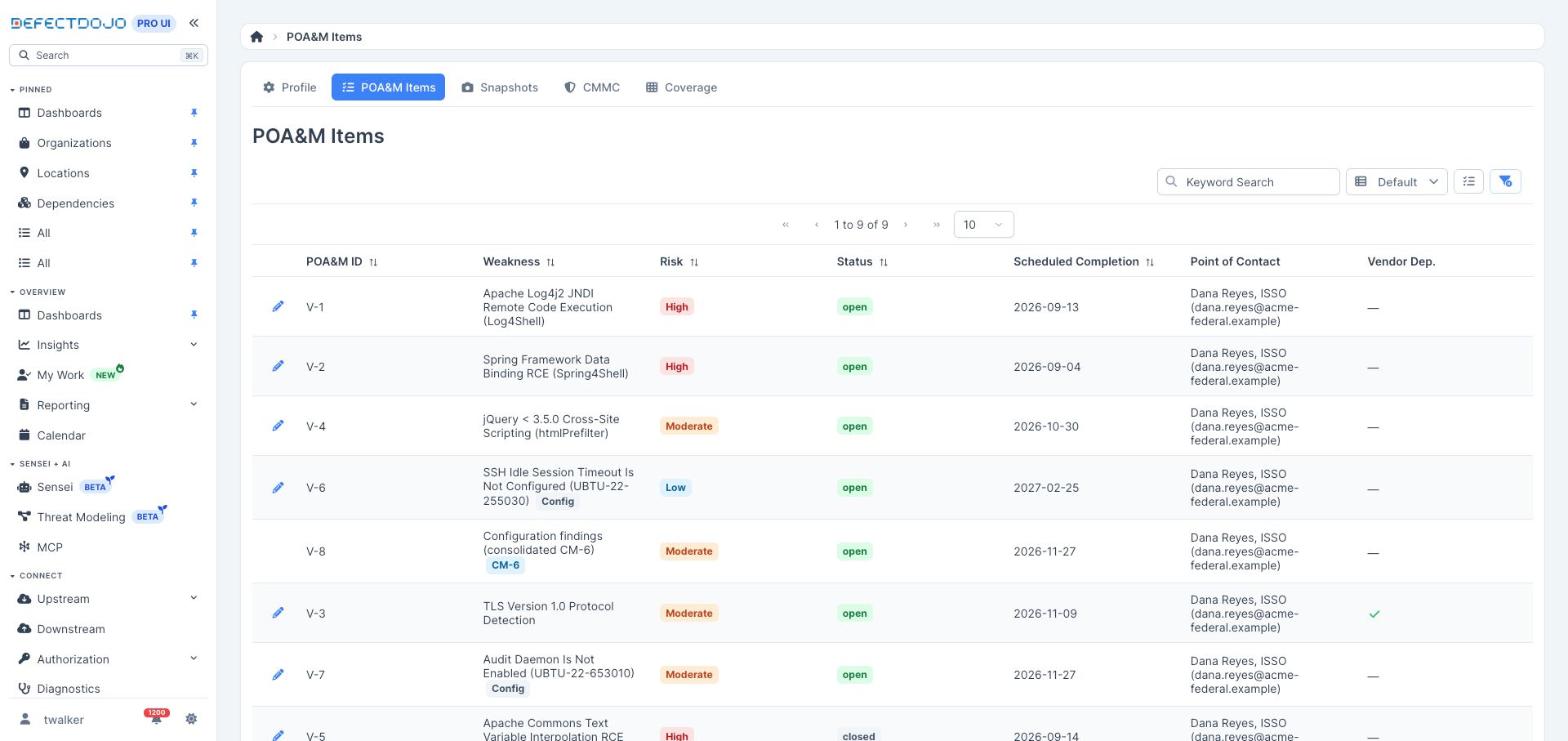
Monthly Snapshots therefore carry the PAIN-driven commitment an assessor expects to see, and late items are measured against it. For the ledger’s conventions see The POA&M Ledger, and for the monthly deliverables see ConMon Snapshots.
Reference
- FedRAMP 20x Class C, Vulnerability Detection and Response — rule VDR-TFR-PVR carries the mitigation timeframe table.
- FedRAMP rule VER-EVA-EPA (Estimate Potential Agency Impact) — the N-rating definitions.
- Remediation Deadlines — the FedRAMP Rev 5 and FedRAMP VDR SLA presets.