

Upstream Connectors Tool Reference (Pro)
Note: Upstream Connectors are a DefectDojo Pro-only feature.
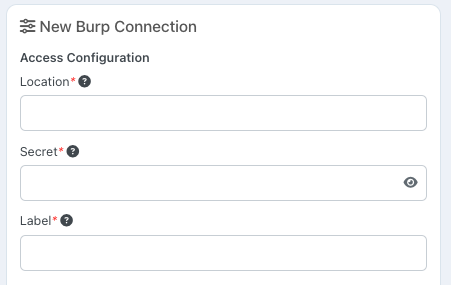
When setting up a Connector for a supported tool, you’ll need to give DefectDojo specific information related to the tool’s API. At a base level, you’ll need:
- Location -a field whichgenerallyrefers to your tool’s URL in your network,
- Secret - generally an API key.
Some tools will require additional API-related fields beyond Location and Secret. They may also require you to make changes on their side to accommodate an incoming Connector from DefectDojo.
Many tools serve one fixed API host. For those, DefectDojo fills in Location for you when you add the Connector, so you do not have to copy the URL out of this page. Keep the value you are given. Change it only if your instance uses a different host, such as a self-hosted deployment or a different region.
Each tool has a different API configuration, and this guide is intended to help you set up the tool’s API so that DefectDojo can connect.
Whenever possible, we recommend creating a new ‘DefectDojo Bot’ account within your Security Tool which will only be used by the Connector. This will help you better differentiate between actions manually taken by your team, and automated actions taken by the Connector.
Asset Connectors
Most Connectors import findings from a security tool. Asset Connectors work differently: they import your asset inventory instead. An Asset Connector enumerates the assets that exist in an external platform (for example, the repositories in a GitLab group) and automatically creates and maintains the matching Assets and Organizations in DefectDojo. No findings are imported by an Asset Connector.
- Discover and Sync both reconcile the asset list. New assets appear as
NEWRecords; once mapped (automatically, if auto-mapping is enabled), DefectDojo creates the Asset and groups it under an Organization derived from the tool — for example, the GitLab namespace or the Azure DevOps project. - If an asset is later removed upstream (for example, a repository is deleted), its mapped Record is flagged
MISSINGon the next Sync so your team can triage it. DefectDojo never silently deletes an Asset.
Azure DevOps, Backstage, Bitbucket, GitHub, GitLab, Google Cloud, JSM Assets, Microsoft Azure, and ServiceNow CMDB are Asset Connectors. runZero is primarily an Asset Connector but can optionally import vulnerabilities as findings. All other Connectors listed below import findings.
Supported Connectors
- AccuKnox
- Action1
- Acunetix 360
- Akamai
- Akto
- Alert Logic
- Anchore Enterprise
- AppCheck
- Aqua Security
- Aqua Supply Chain
- Automox
- Azure DevOps
- Backstage
- Beagle Security
- BigID
- Black Duck
- Bitbucket
- Black Duck Continuous Dynamic
- Bugcrowd
- Bright Security
- Burp Suite Enterprise
- Calico Cloud
- Censys
- Checkmarx One
- Chef Automate
- CI Fuzz
- Cloudflare
- Cobalt.io
- Codacy
- Contrast
- Coverity
- CrowdStrike Falcon
- CyberArk Certificate Manager
- Cyberwatch
- CyCognito
- Datadog
- Deepfence ThreatMapper
- DeepSource
- Dependency-Track
- Detectify
- Docker Scout
- Dragos
- Elastic Security
- Endor Labs
- Edgescan
- Escape
- Fairwinds Insights
- Finite State
- Fleet
- Fortify
- FOSSA
- GitGuardian
- GitHub
- GitHub Advanced Security
- GitLab
- Google Artifact Analysis
- Google Cloud
- Google Cloud SCC
- Group-IB ASM
- HackerOne
- Halo Security
- Harbor
- Have I Been Pwned
- HCL AppScan
- HiddenLayer
- Holm Security
- ImmuniWeb
- InsightCloudSec
- Intigriti
- Intruder
- IriusRisk
- JFrog XRay
- JSM Assets
- Klocwork
- Kubescape
- Mend
- Lacework / FortiCNAPP
- Microsoft Azure
- Microsoft Defender
- Microsoft Defender for Cloud
- MobSF
- NetRise
- NeuVector
- Nightfall AI
- NowSecure
- Nozomi Networks
- Nuclei (ProjectDiscovery Cloud)
- OpenVAS / Greenbone
- Orca Security
- Ostorlab
- Parasoft DTP
- Picus Security
- PingCastle
- Probely
- Promptfoo
- Prowler
- Qualys
- Quay
- Qwiet AI
- Rapid7 InsightAppSec
- Rapid7 InsightVM
- Rapid7 InsightVM - Cloud Instance
- Red Hat Satellite
- runZero
- Scantist
- Security Hub
- Semgrep
- ServiceNow CMDB
- Shodan
- SonarQube
- Snyk
- Socket
- Sonatype IQ
- SOOS
- Sysdig Secure
- Tenable.io
- Tenable Web App Scanning
- TruffleHog
- Trustwave Fusion
- Uptycs
- Vanta
- Veracode
- Vulnerability Manager Plus
- Wallarm
- Wazuh
- WebInspect Enterprise
- Wiz
- YesWeHack
- Zimperium
- Zora