

Organizations (Pro)
ORGANIZATIONS → Assets → Engagements → Tests → Findings
Overview
Organizations sit at the very top of DefectDojo’s Asset hierarchy. Organizations are distinct from the descending objects in the hierarchy—Assets, Engagements, Tests, and Findings—because they are not technical scan targets, but rather serve primarily as organizational abstractions that compartmentalize your security efforts according to:
- Business domain
- Development team
- Security team
- Software applications
- Overarching product family
- Customer or subsidiary
- Reporting structure
- etc.
The theme of the above examples exemplifies the essential utility of Organizations: they should generally represent stable, long-lived boundaries within your security program.
Organization Data and Structure
As Organizations are not scanned directly, the only mandatory field required to create them is a name. Beyond that, they act as containers for Assets and their descending Engagements, Tests, and Findings.
When creating an Organization, consider how their structure will inform your reporting. Do you primarily need Organizations to represent the teams working on the projects (Assets) that Organizations will contain? Or would Organizations better represent overarching projects that contain different iterations of the projects (Assets) within it?
If you have a single Organization that contains all of the relevant information for a given business domain or development team, having that represented as an Organization will facilitate smoother reporting, rather than having to pull together a report from various Assets and Organizations.
If a particular software project has many distinct deployments or versions, it may be worth creating a single Organization which covers the scope of the entire project and having each version exist as individual Assets. In some workflows, Organizations may also be used to separate software lifecycle stages: one Organization for “In Development,” one Organization for “In Production,” etc. Organizations can be used to determine access to subsidiaries, acquired companies, or other regulated business units for RBAC purposes. In complex businesses, where there are a lot of unique projects with different access rules, Organizations are particularly relevant.
Ultimately, the decision of how to use Organizations and Assets depends on how you best wish to reflect your unique organizational structure and the needs of your security team.
Below are some example structures to inform how you designate your objects as either Organizations or Assets.
Organization: Payments Division
- Asset: Payments API - Production
- Asset: Payments API - Staging
- Asset: Billing Worker
Organization: Software Asset A
- Asset: Web Portal
- Asset: Mobile Backend
Additionally, the following is an illustrative guide as to whether a something is better represented by an Organization or an Asset:
| Organizations | Assets |
|---|---|
| Business units | Individual applications |
| Departments | Deployments/environments |
| Security ownership domains | Infrastructure components |
| Product families | Specific microservices |
| Portfolio-level reporting | Scan targets |
| Customers | Specific software versions |
As noted, your structure may differ depending on your unique security needs.
Organization Types
Organizations carry a type that records what kind of boundary they represent:
- Team — the people who own or work on the Assets
- Business Application — a business-level application made up of several Assets
- Compliance Scope — a regulated boundary such as PCI or FedRAMP
- Portfolio — a roll-up grouping for executive or portfolio-level reporting
- Custom — anything else (the default)
Types are orthogonal ways of looking at the same inventory: with non-exclusive membership enabled (below), one Asset can sit in a Team, a Compliance Scope, and a Portfolio at the same time, and each of those Organizations answers a different question about it.
The type is set when creating or editing an Organization, is shown as a badge on the
Organization’s view, and is filterable on the API (org_type on
/api/v2/organizations/).
Nesting within a type
Organizations of the same type can be nested with a parent Organization for drill-down navigation and reporting — for example, a “Payments” Portfolio inside a “Company” Portfolio. Nesting is deliberately limited:
- A parent must have the same type as its child, and cycles are rejected.
- Nesting is for reporting and navigation only — it does not grant access. A user with a role on a parent Organization does not gain access to its children.
Non-Exclusive Membership
By default, every Asset belongs to exactly one Organization. Deployments that opt in to non-exclusive membership can additionally place an Asset in any number of further Organizations, so the same Asset can be visible through its Team, its Compliance Scope, and its Portfolio without duplicating it.
This behavior is managed by deployment configuration: set
DD_V3_ORGANIZATION_NONEXCLUSIVE=True (self-hosted) or contact support (cloud). It
is off by default.
Primary and additional memberships
- Each Asset always has exactly one primary membership: the Organization shown on the Asset itself. The primary membership is the access and billing anchor and cannot be removed — change the Asset’s Organization to move it.
- Any further memberships are additional and carry a record of where they came
from:
- User Pin — added by hand from the Organization or Asset view
- Connector — kept in sync from a connector’s grouping attributes (for example, the Backstage connector maps a service’s Domain to a Portfolio-type Organization and its Owner Group to a Team-type Organization)
- Rule — granted by a membership rule (“Assets tagged
pcibelong to the PCI Organization”); when the tag no longer matches, the membership dissolves
- Automation only ever reconciles memberships it created itself. User pins are never removed by a connector sync or a rule.
Membership and access
Access follows every membership, not just the primary one: a user with a role on any of an Asset’s Organizations can see the Asset (and its Engagements, Tests, and Findings) with the permissions that role grants. Pinning an Asset into an Organization therefore extends visibility, which is why creating a pin requires edit permission on both the Organization and the Asset.
Notifications follow the same rule. Notifications about an Asset — and about its Engagements, Tests, and Findings — reach the members of every Organization the Asset belongs to, not only its primary one, subject as always to each user’s own notification preferences. So pinning an Asset into a Compliance Scope Organization also makes that scope’s members an audience for its findings, and removing the membership removes them again.
Managing memberships
- The Organization view gains a Member Assets table listing every member with its provenance, plus a Pin Asset action.
- The Organization view’s Asset list — and the
organizationfilter on the Asset and Finding lists — covers every member Asset, whether it lives here or is a member through a pin, rule, or connector. (Filtering by the classic organization field alone still matches only Assets whose home is that Organization.) - The Asset view gains an Organization Memberships panel listing the Asset’s memberships — each Organization with its type and provenance — plus a Pin to Organization action.
- Additional memberships can be removed from either surface. Removing a connector- or rule-created membership works the same way, but the next sync or tag match may recreate it; disable the rule or adjust the connector mapping to make it permanent.
- On the API, memberships live at
/api/v2/organization_memberships/(filterable byproduct,organization,origin, andis_primary); the Organization type and parent are readable and writable on/api/v2/organizations/asorg_typeandparent_organization.
Roles Scoped to an Organization Type
Roles are normally granted one Organization at a time. Deployments that opt in can also grant a role against an Organization type, so it applies to every Organization of that type at once — “this user is a Reader on every Compliance Scope”. The grant is not a list of Organizations that gets expanded once; it is evaluated live, so an Organization created next month is covered the moment it is given that type, with nothing to backfill.
This is useful wherever the audience is defined by the kind of boundary rather than by a fixed list: compliance auditors who must see every regulated scope, platform teams who need read access across every Team Organization, or executives reporting over every Portfolio.
This behavior is managed by deployment configuration: set
DD_V3_ORGANIZATION_TYPE_ROLES=True (self-hosted) or contact support (cloud). It is
off by default, and while it is off a grant has no effect on access.
What a type-scoped grant does
A type-scoped grant behaves in every respect as though the grantee held that role on each Organization of that type individually:
- It grants access to those Organizations and to the Assets in them, with exactly the permissions the role carries — a type-scoped Reader grant is still only a Reader. Scoping widens which Organizations a role reaches, never what the role can do.
- It follows the same union-of-grants rule described under Membership and access: with non-exclusive membership enabled, it also reaches Assets that are members of a covered Organization through a pin, rule, or connector, not only Assets whose home it is.
- It is additive, like every other grant in DefectDojo. Access can only be widened by a grant, never withdrawn by one, so a type-scoped grant can never reduce access somebody already had.
- It ignores nesting, which remains reporting-only. A grant covers Organizations of the type, not the children of any one of them.
An Organization is reached by a grant only while it actually carries that type. Re-typing an Organization moves it out of one grant’s scope and into another’s, which is worth knowing before re-typing a live Organization.
Managing type-scoped grants
Because a type-scoped grant reaches Organizations that do not exist yet, it cannot be
delegated through permissions on any single Organization. Only superusers and global
owners can view or manage these grants, in the UI or on the API at
/api/v2/organization_type_roles/ (filterable by org_type, user, group, and
role). A grant names either a user or a group — a group grant applies to the group’s
members — and each grantee holds at most one role per type.
In the UI, grants live on the Roles settings page (Settings → Roles), in an Organization Type Roles card that appears for global owners once the feature is enabled. The card lists every grant with its type, grantee, and role; New Grant opens a dialog that takes the Organization type, a user or group, and the role, and each row offers a revoke action with a confirmation step.
On an Organization’s own view, a type-scoped grant indicator appears beside the title when one or more grants cover that Organization’s type. Hovering it lists the grants (role and grantee), and clicking it opens the Roles page. The indicator is visible only to superusers and global owners, the same audience that can read the grant list itself, so an Organization-level viewer learns nothing about who holds broad access.
Grants are created and revoked rather than edited: to change the role or the type, revoke the grant and create the replacement, which keeps the audit trail honest about what access existed when. Grants remain readable and revocable even if the feature is later switched off, so a deployment can always inspect and clean up what it created.
Accessing Organizations
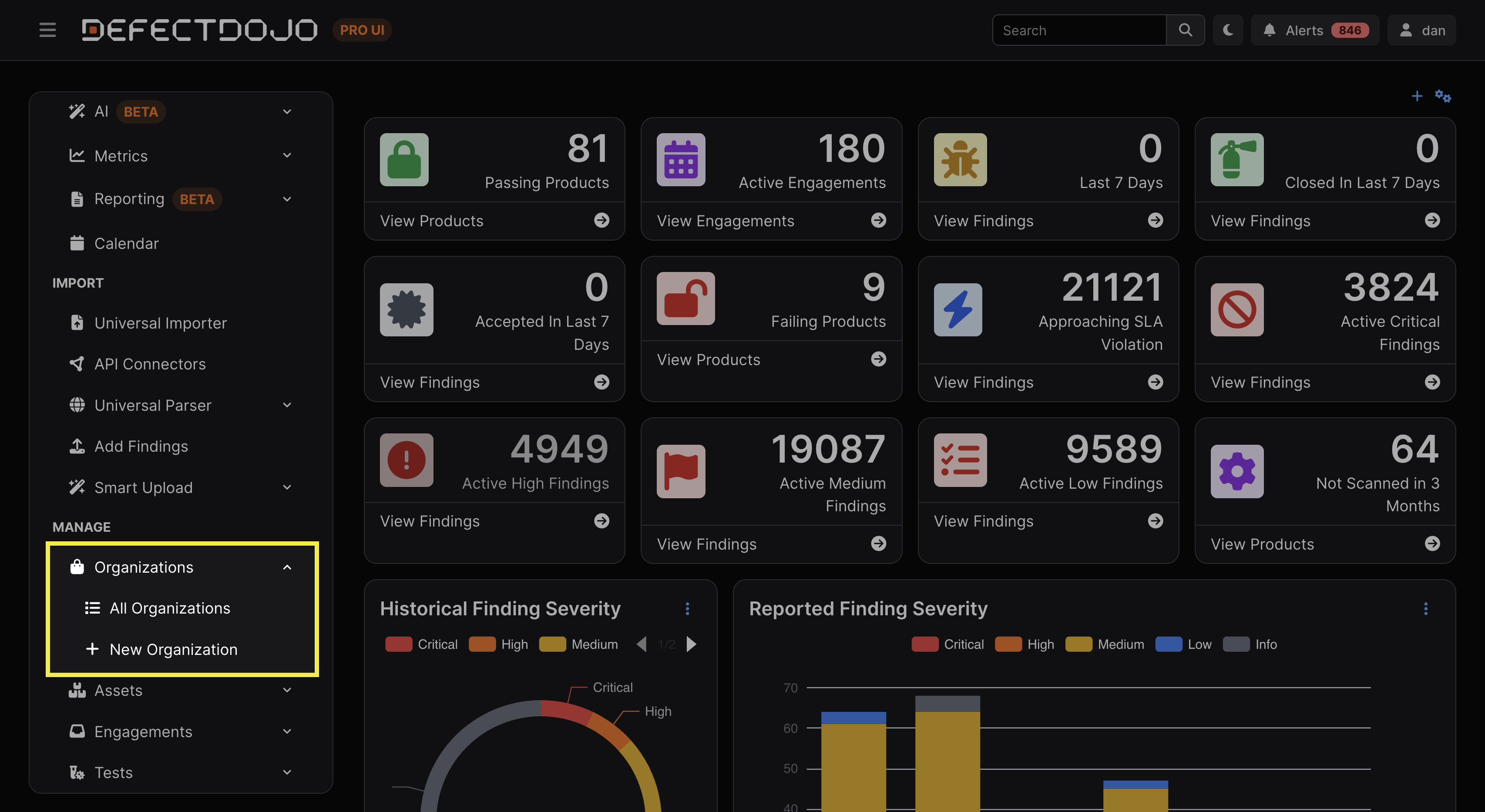
Organizations are accessible via the sidebar. The submenu provides access to All Organizations as well as the option to create a new Organization.
Organization View
An Organization’s view contains a variety of tables and charts to interpret its status at a glance. This includes:
- Description
- Commerce
- Whether the Organization has been determined to be Critical or Key
- Checking Critical or Key is used solely for filtering purposes
- Whether the Organization has been determined to be Critical or Key
- Assigned Members (DefectDojo Users)
- Assigned User Groups
- User groups that have been assigned to the Organization for permission control. More information about user groups can be found here.
- List of Assets within the Organization
With non-exclusive membership enabled, the view also shows the Organization’s type badge and parent next to its name, and a Member Assets table listing every member Asset with the provenance of its membership (see Non-Exclusive Membership).
Working with Organizations
Create Organizations
There are two ways to create Organizations:
- From the New Organization option in the side menu
- From the New Organization button at the top of the All Organizations list
Edit Organizations
Organizations can be edited by clicking Edit Organization from within the gear menu at the top right of the Organization’s view. The same menu can also be accessed by clicking the ⋮ kebab menu to the left of the Organization in the All Organization view.
All ensuing fields that can be edited are also available when the Organization is being created.
Delete Organizations
Deleting an Organization can be performed by selecting Delete Organization from the Organization’s settings.
Because Organizations sit at the top of the hierarchy, deleting them removes all downstream security history, relationships, and child objects, such as:
- Any Assets, Engagements, and Tests contained within the Organization
- All associated security history, including Findings and integrations
- Any linked Jira Epics
- All notes and file uploads associated with the Assets, Engagements, and Tests within that Organization
Deleting an Organization can’t be undone. If you would like to “decommission” an organization without deleting underlying data (for example, preserving legacy software testing records for audit purposes), you can change the Organization’s name or add a Tag to indicate that it is in a deprecated state.
Organiations vs. Metadata
Organizations are intended to represent structural ownership or reporting boundaries, rather than lightweight classifications. Attributes such as deployment status, internal labels, or temporary workflow states may be better represented through tags or metadata rather than separate Organizations.
Organization Boundaries
Organizations establish both reporting and access boundaries within DefectDojo. Because integrations, RBAC permissions, ownership, metrics, and deduplication models frequently inherit Organizations’ structure, designing clear boundaries early helps avoid hierarchy sprawl and reporting fragmentation later.
Findings and Automation
Although integrations are typically configured on lower-level objects such as Assets, Engagements, or Findings, Organizations still define the ownership, reporting, and access boundaries within which those integrations operate.
Permissions cascade downward, meaning that access to an Organization automatically grants access to all objects within that Organization (e.g., Assets, Engagements, Tests, and Findings).
The DefectDojo RBAC model can be used to gate human user access, but can also restrict API tokens’ access to particular Organizations.
For more information on user roles, see our Introduction To Permission Types article.
Ownership
As top-level objects, Organizations also imply ownership over the child objects within them. SLA tracking, remediation workflows, ticket routing, and general governance all flow more smoothly when Organizations have been set up to accurately reflect the individuals accountable for them.
Metrics/Reporting
Metrics dashboards, tiles and views can be filtered per Organization, making them a critical component in how your security data is calculated, visualized, and ultimately exported.
For reporting purposes, it is generally easier to combine multiple Organizations into a single document than it is to subdivide a single Organization into separate documents. Therefore, we recommend setting up Organizations at as granular a level as makes sense for your team’s reports. For example, there is no need to represent a large business division as an Organization if you’re primarily going to be reporting to individual departments within that division.
Effectively structuring your Organizations to reflect your reporting needs is critical to accurately assessing your security posture. For more information on Metrics, click here.
Deduplication
Deduplication in DefectDojo occurs at the Asset level, and is not affected by the parent Organization.