

Custom RBAC Roles (Pro)
DefectDojo Pro feature. The Members / Groups / Global Roles RBAC system described on this page is part of DefectDojo Pro. Open-source DefectDojo uses the Authorized Users model. See that page for open-source access control, and the 3.0 upgrade notes if you’re moving between editions.
DefectDojo Pro ships five roles: Reader, Writer, Maintainer, Owner, and API Importer. If none of them is the right fit, you can now build your own role by choosing exactly which permissions it grants.
A custom role works anywhere a built-in role works: as a Global Role, as a Group’s role, as the default group role, and as a member role on an individual Organization or Asset.
The five built-in roles become locked, clonable presets. Their permissions are unchanged (see the Action permission charts for what each one grants), they cannot be edited or deleted, and cloning one is the recommended way to start a new role.
Before you start
Custom role management is off by default. A superuser turns it on from Settings > Feature Flags, by enabling Custom Roles. See Feature Flags for how that page works.
While the feature is off, the Roles page is still readable: you can view the built-in roles and their permissions, but you cannot create, edit, clone, or delete anything.
Managing roles requires superuser status or the built-in Owner Global Role. This is deliberate and cannot be delegated to a custom role: see What a custom Global Role unlocks.
Opening the Roles page
Go to Settings > Users & Permissions > Roles in the left sidebar. The menu entry is visible to superusers and holders of the built-in Owner Global Role.
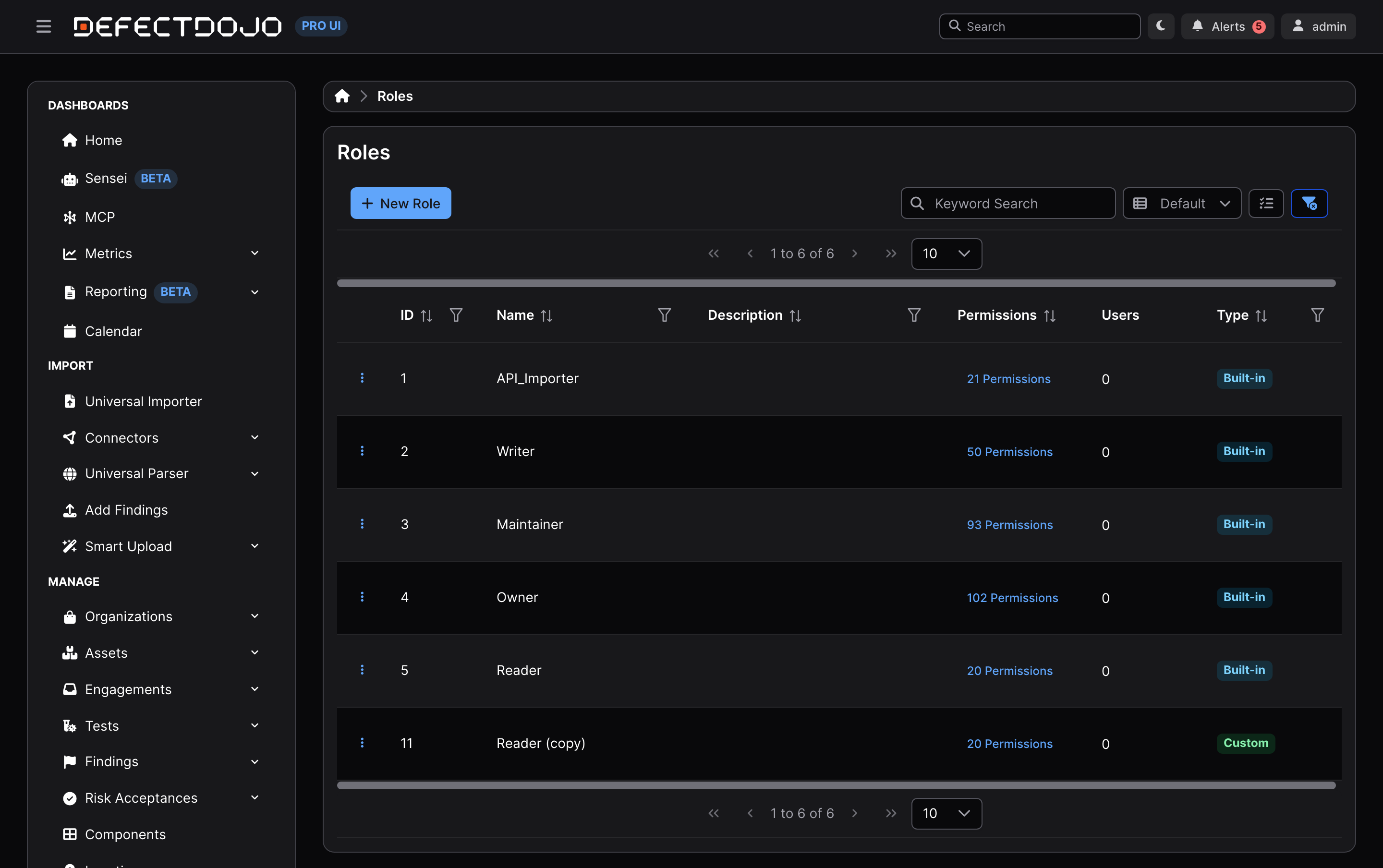
The table lists every role in your instance:
| Column | What it shows |
|---|---|
| ID | The role’s numeric id. Useful when filtering the Users table or calling the API. |
| Name | The role name. |
| Description | Your own note about what the role is for. Optional, and empty unless someone fills it in. The built-in roles ship without one. |
| Permissions | A count of granted permissions. Click it to open a read-only view of the full grid. |
| Users | How many users hold this role as their Global Role. Click through to see them in the Users table. |
| Type | Built-in for the five presets, Custom for roles you created. |
Every column is sortable and filterable, and the keyword search matches on name and description.
Creating a role
Clone a built-in role (recommended)
Cloning starts you from a known-good permission set instead of an empty grid, which makes it much harder to accidentally leave out a permission a role needs.
- Find the role closest to what you want.
- Open its ⋮ menu and choose Clone Role.
- A copy is created immediately, named
<original> (copy), with the same permissions and description as the role it came from. - Open the copy’s ⋮ menu, choose Edit Role, then rename it and adjust its permissions.
Built-in roles can be cloned even though they cannot be edited. The clone records which role it came from.
Start from scratch
- Click New Role.
- Give it a Name (required) and optionally a Description.
- Choose its permissions in the grid below (see the next section).
- Click Save Role.
Role names must be unique, and the check ignores case: if Triage Lead exists, triage lead is rejected.
Choosing permissions
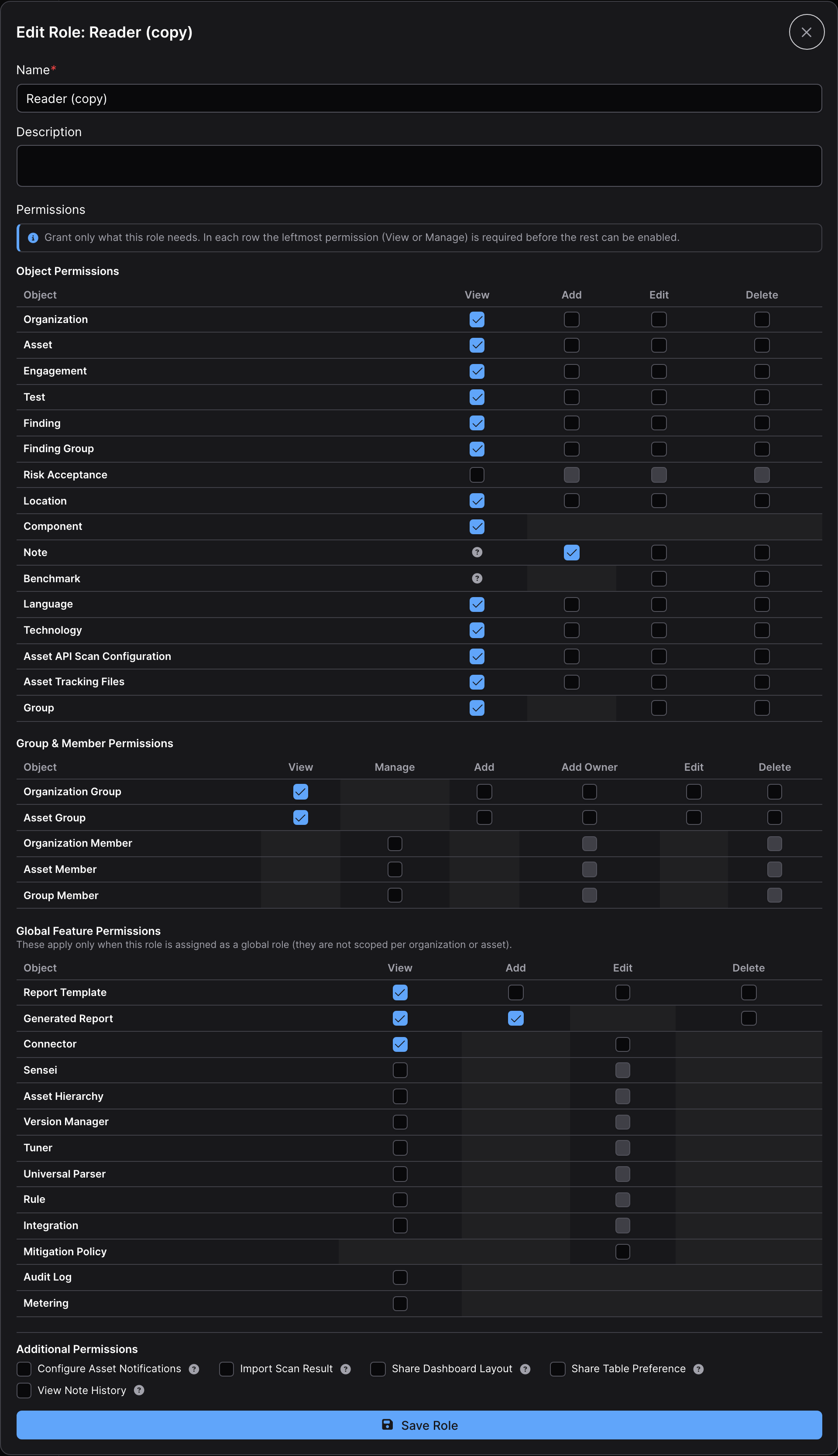
Permissions are grouped into three tables plus a checklist.
Object Permissions apply to the Organizations and Assets the role is assigned to, and to everything nested under them.
| Row | View | Add | Edit | Delete |
|---|---|---|---|---|
| Organization | ☑️ | ☑️ | ☑️ | ☑️ |
| Asset | ☑️ | ☑️ ¹ | ☑️ | ☑️ |
| Engagement | ☑️ | ☑️ | ☑️ | ☑️ |
| Test | ☑️ | ☑️ | ☑️ | ☑️ |
| Finding | ☑️ | ☑️ | ☑️ | ☑️ |
| Finding Group | ☑️ | ☑️ | ☑️ | ☑️ |
| Risk Acceptance | ☑️ | ☑️ | ☑️ | ☑️ |
| Location | ☑️ | ☑️ | ☑️ | ☑️ |
| Component | ☑️ | |||
| Note | ² | ☑️ | ☑️ | ☑️ |
| Benchmark | ² | ☑️ | ☑️ | |
| Language | ☑️ | ☑️ | ☑️ | ☑️ |
| Technology | ☑️ | ☑️ | ☑️ | ☑️ |
| Asset API Scan Configuration | ☑️ | ☑️ | ☑️ | ☑️ |
| Asset Tracking Files | ☑️ | ☑️ | ☑️ | ☑️ |
| Group | ☑️ | ☑️ | ☑️ |
- Asset > Add means creating a new Asset inside an Organization the role is assigned to.
- View for Notes and Benchmarks is inherited: a role that can view the parent Engagement, Test, Finding, or Asset can view its Notes and Benchmarks. These cells show a ? icon instead of a checkbox.
Group & Member Permissions control who can manage membership. The columns here are View, Manage, Add, Add Owner, Edit, and Delete.
| Row | Available actions |
|---|---|
| Organization Group, Asset Group | View, Add, Add Owner, Edit, Delete |
| Organization Member, Asset Member, Group Member | Manage, Add Owner, Delete |
Global Feature Permissions gate instance-wide Pro features rather than individual Organizations or Assets, so they only take effect when the role is held as a Global Role. Granting them on a role that is only used as an Asset membership has no effect.
| Row | Available actions |
|---|---|
| Report Template | View, Add, Edit, Delete |
| Generated Report | View, Add, Delete |
| Connector, Sensei, Asset Hierarchy, Version Manager, Tuner, Universal Parser, Rule, Integration | View, Edit |
| Mitigation Policy | Edit |
| Audit Log, Metering | View |
Additional Permissions is a checklist of capabilities that don’t fit a View/Add/Edit/Delete shape:
- Configure Asset Notifications: choose which notifications a single Asset sends, and where.
- Import Scan Result: import and re-import scan results, creating and updating findings.
- Share Dashboard Layout: publish a dashboard layout to other users. Global Role only.
- Share Table Preference: publish a saved table view (columns, filters, sort order). Global Role only.
- View Note History: see who changed a note and when.
How to read the grid
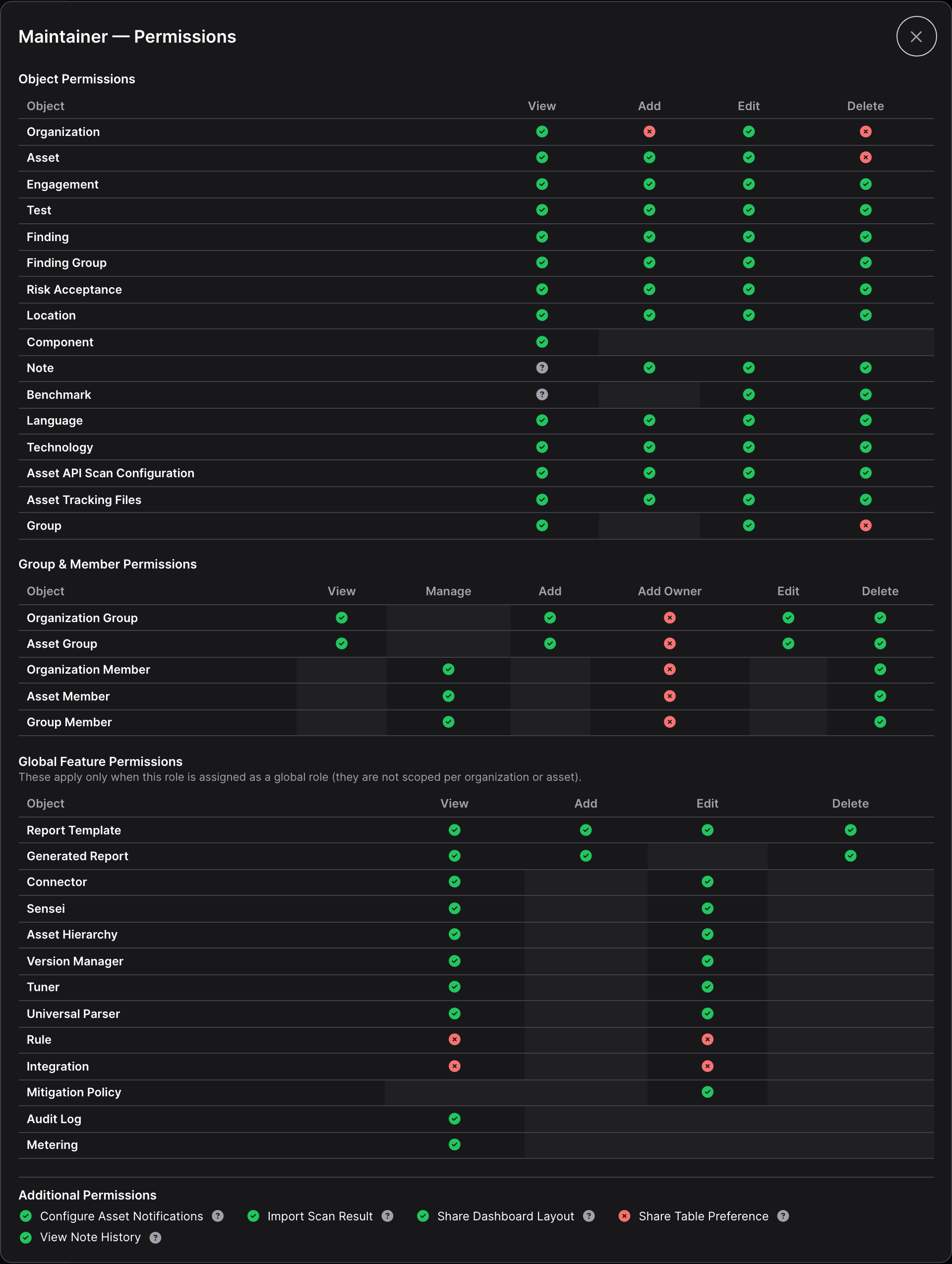
| What you see | What it means |
|---|---|
| An empty checkbox | The permission exists and is not granted. Click to grant it. |
| A checked checkbox | Granted. |
| A shaded, empty cell | The permission does not exist for that row and action. Not selectable. |
| A ? icon | View is inherited from a parent object, so there is nothing to grant here. |
| A green ✔ (read-only view) | Granted. |
| A red ✘ (read-only view) | Not granted. |
In each row, the leftmost permission (View, or Manage on member rows) gates the rest of the row. You have to grant it before the other cells in that row become available, because a role cannot meaningfully edit or delete what it cannot see. Clearing the gate clears the rest of the row with it.
Editing, cloning, and deleting
Each row’s ⋮ menu offers Edit Role, Clone Role, Delete Role, and Role History.
Built-in roles only offer Clone Role. They cannot be edited or deleted, by anyone, including superusers. This keeps a known baseline in place and keeps upgrades predictable.
Deleting a role that is still assigned to anyone will fail. Reassign or remove those assignments first, then delete the role. Assignments that count for this purpose are Organization and Asset memberships (both user and group), Global Roles, Group memberships, and the default group role in System Settings.
The API can do the reassignment for you in a single call. See Managing roles through the API.
Assigning a custom role
Custom roles appear in every role dropdown, alongside the built-ins:
| Where | How |
|---|---|
| Global Role on a user | The Global Role field on the user’s form. Superusers only. See Set a User’s permissions. |
| Global Role on a group | The Global Role field on the group’s form. See Share permissions: User Groups. |
| Organization or Asset membership | The Permissions dialog on the Organization or Asset, for both users and groups. See Set Permissions in Pro. |
| Default group role | Default group role in System Settings, applied to newly created users. See Manage default permissions. |
| Role within a group | The role dropdown on a group’s member list. This dropdown only offers roles that grant at least one Group permission, so a role with no Group permissions will not appear there. |
Two constraints are worth knowing:
- Owner-tier is reserved. A custom role can never be an owner-tier role. Only the built-in Owner is, so only it carries the implicit power to manage other Owners.
- Granting the Owner role to someone else still requires the matching Add Owner permission, whether you do it on an Organization, an Asset, or a Group.
What a custom Global Role unlocks
Parts of the UI are gated on a minimum Global Role rather than on an individual permission. To make custom roles work with those gates, DefectDojo ranks a custom Global Role against the built-in tiers: a custom role earns the highest tier whose permissions it completely covers.
- A custom role that covers everything Maintainer grants is treated as Maintainer for those gates.
- Cover everything Writer grants, and it is treated as Writer. Same for Reader.
- Cover none of them completely, and it earns no tier. Its individual permissions still work exactly as granted; only the tier-based UI gates stay closed.
- Owner can never be earned this way. Role management, and everything else gated on the Owner Global Role, stays with superusers and the built-in Owner.
Coverage has to be complete, which occasionally surprises people. A role cloned from Maintainer earns the Maintainer tier. Rebuild Maintainer’s permissions by hand, miss one, and the role lands on the Writer tier instead. If a custom Global Role is missing UI you expected, compare it against the built-in tier in the Action permission charts.
Role history
Custom roles keep an audit trail. Open Role History from a role’s ⋮ menu to see which permissions were granted or revoked, by whom, and when, alongside changes to who holds the role.
Two things this history does not show: changes to a role’s own name and description, and the permissions of built-in roles (those are seeded, never edited, and so never generate history).
Role history is a read, so it is available whether or not the Custom Roles feature is on.
Managing roles through the API
Roles are available at /api/v2/roles/. Reads are open to any authenticated user, because clients need the role list to populate dropdowns. Writes require superuser status or the built-in Owner Global Role, plus the Custom Roles feature flag.
| Operation | Request |
|---|---|
| List roles | GET /api/v2/roles/ |
| Retrieve one role | GET /api/v2/roles/{id}/ |
| List every grantable permission | GET /api/v2/roles/permissions_catalog/ |
| Create a role | POST /api/v2/roles/ with name, optional description, and a permissions list |
| Replace a role’s permissions | PATCH /api/v2/roles/{id}/ with a permissions list |
| Clone a role | POST /api/v2/roles/{id}/clone/ with an optional name and description |
| Delete a role | DELETE /api/v2/roles/{id}/ |
| Delete a role and move its assignments | DELETE /api/v2/roles/{id}/?reassign_to={other_role_id} |
| Read a role’s history | GET /api/v2/roles/{id}/history/ |
Notes:
permissionsreplaces the role’s grant list rather than adding to it. Send the full set you want the role to end up with.?reassign_to=moves every assignment of the deleted role to the role you name, in one transaction. This is the only way to reassign in bulk: the UI does not offer it.- Attempting to edit or delete a built-in role returns
403. Editing an unknown permission value, reusing an existing role name, or deleting an in-use role withoutreassign_toreturns400with an explanation. is_ownercannot be set through the API. Posting it is accepted and ignored.
Things to know
- Multiple roles on the same object grant the union of their permissions. If a user holds a role directly on an Asset and inherits another through a group, they get everything either role grants. Roles only ever add permissions, never remove them.
- Permission changes are picked up on the next page load, not instantly in the current view. Background jobs may take up to 30 seconds, and cached permission data up to 5 minutes, to reflect an edit.
- Role dropdowns list up to 250 roles. Beyond that, some roles will not appear in dropdowns, though they continue to work.
- Maintainer and Owner can add Organizations, but the grid does not show it. For those two roles that grant is stored as a global-scope grant, and the grid reads only object-scope grants, so their Organization > Add cell reads as not granted. Cloning either role preserves the grant.
- Terminology follows your instance. These docs use Organization and Asset, the default labels. If your instance has turned Organization / Asset relabeling off, the same rows read Organization and Asset instead.
- The Roles page is read-only for everyone else. A user who reaches
/settings/rolesdirectly can see the roles and their permissions but cannot change anything. Permission data is not sensitive, and the server enforces the real boundary on every write.