

OIDC (Pro)
DefectDojo Pro supports login via a generic OpenID Connect (OIDC) provider. Open-source DefectDojo does not include SSO — see Authorized Users for open-source access control.
Configuration
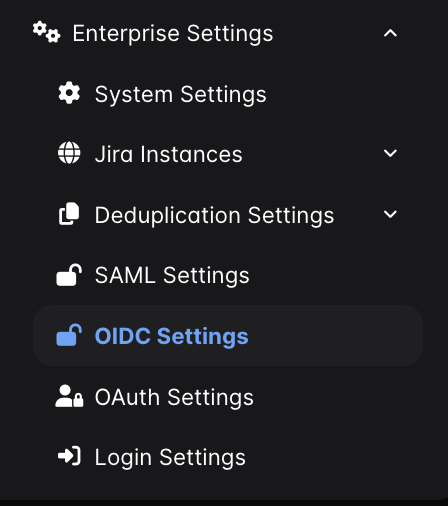
In DefectDojo, go to Connect > Authorization > Providers and select OpenID Connect.
Fill in the form:
- Endpoint — the base URL of your OIDC provider. Do not include
/.well-known/openid-configuration. - Client ID — your OIDC client ID.
- Client Secret — your OIDC client secret. After you save it, the secret is never shown again. Leave the field blank to keep it, and enter it again only if you change the client ID or the endpoint.
- Optionally configure Claim Mapping and Group Mapping — see below.
- Check Enable OIDC.
Submit the form. A Log In With OIDC button will appear on the DefectDojo login page.
Use Validate Config at any point to check the settings without saving them. It fetches the discovery document, verifies the signing keys and issuer, echoes the exact redirect URI to register at your provider, and cross-checks your claim and group mappings against the claims the provider advertises.
Claim Mapping
Each row maps one OIDC Claim to the DefectDojo Field it should populate. Use Add Claim Mapping for additional rows and the bin icon to remove one.
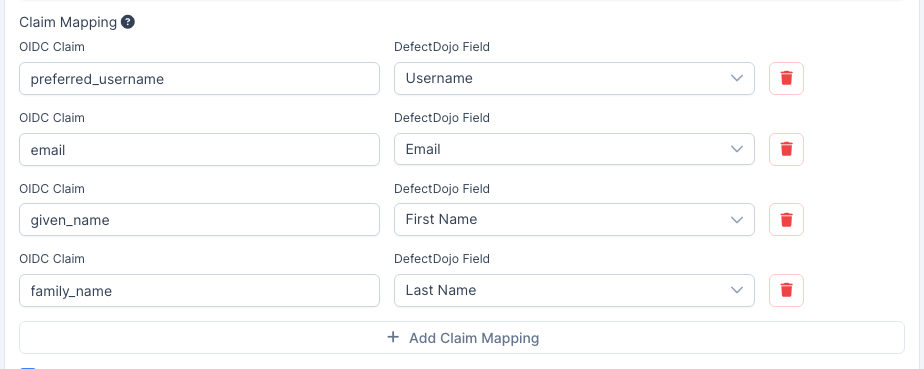
A field with no row keeps its standard claim, so this section is only needed when your provider names things differently. The standard claims are:
| DefectDojo Field | Standard claim |
|---|---|
| Username | preferred_username |
email | |
| First Name | given_name |
| Last Name | family_name |
Notes:
- An unconfigured instance opens with those four rows already filled in, so you can see what OIDC is doing before you change anything.
- The same claim may feed more than one field. Each DefectDojo field may be mapped from only one claim.
- Claims are read from the ID token as well as the userinfo response, so a claim your provider releases in only one of the two still works.
- If a mapped claim is missing or empty for a given user, that field keeps its standard value rather than being blanked.
Group Mapping
DefectDojo can mirror the groups your provider reports into DefectDojo groups on each login. Check Enable Group Mapping to reveal the settings.
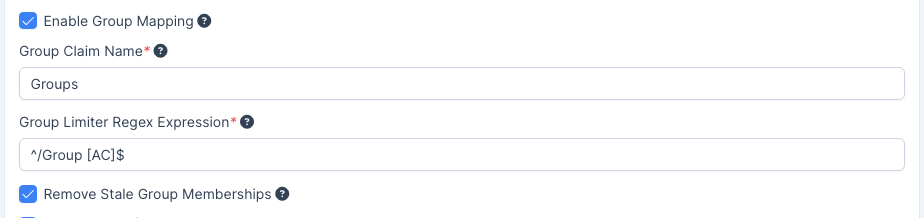
- Group Claim Name — the claim containing the user’s groups. Most providers do not emit one by default and need a mapper configured explicitly; in Keycloak, for example, add a Group Membership mapper to the client. Note that a User Realm Role mapper sends realm roles, not groups.
- Group Limiter Regex Expression — only groups matching this expression are mirrored. Use
.*to allow all. - Remove Stale Group Memberships — when enabled, memberships in OIDC-provisioned groups the provider no longer reports are removed on the next login. Only groups created by OIDC are affected; groups you assigned by hand, and groups provisioned by another provider such as SAML, are never touched.
Groups are created on first use and named exactly as the provider reports them. If your provider sends full group paths (Keycloak’s Group Membership mapper does this when Full group path is enabled), the DefectDojo group is named /Group A rather than Group A. Turn that option off if you want the names to match groups arriving from another provider, otherwise you will end up with two DefectDojo groups for the same logical group.
If group mapping appears to do nothing, run Validate Config: it reports whether the claim you named is one the provider advertises.