

LDAP Authentication (Pro)
DefectDojo Pro supports LDAP authentication from Connect > Authorization > Providers — no custom Docker images or configuration files are required.
Unlike the other providers on this page, LDAP is not a redirect-based flow. Users sign in with the standard DefectDojo username and password form, and their credentials are checked against your directory. There is no extra login button.
Configuration
Open Connect > Authorization > Providers and select LDAP.
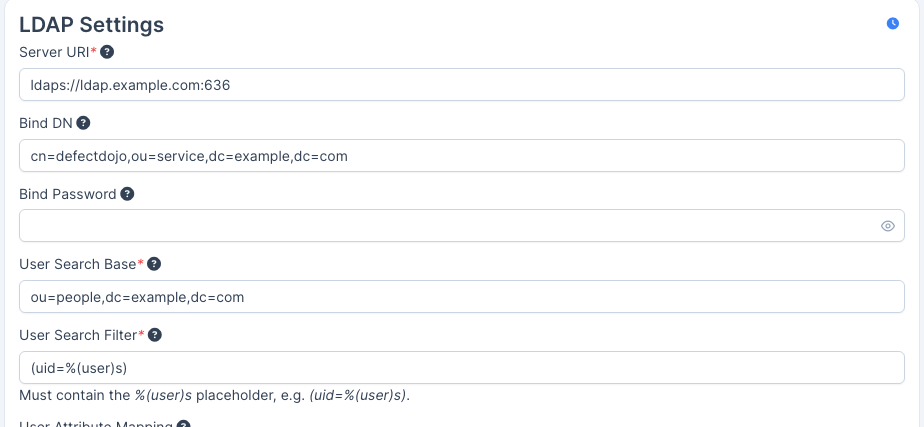
- Server URI — the directory to connect to, e.g.
ldaps://ldap.example.com:636. Preferldaps://. If you must use plainldap://, enable Use StartTLS below so the connection is upgraded before credentials are sent. - Bind DN — the distinguished name of the service account used to search for users. Leave blank for an anonymous bind.
- Bind Password — the password for that service account. The stored value is never returned to the browser; leave the field blank to keep the password you already saved.
- User Search Base — the DN to search beneath for user entries, e.g.
ou=people,dc=example,dc=com. - User Search Filter — the filter used to locate the user. It must contain the
literal
%(user)splaceholder, which is replaced with the submitted username. Common values are(uid=%(user)s)for OpenLDAP and(sAMAccountName=%(user)s)for Active Directory. - User Attribute Mapping — see below.
- Check Enable LDAP to activate it.
Use Validate Config to check the settings without saving them. It reports on settings completeness, whether the server is reachable, whether the bind succeeds, whether the search bases resolve, and whether the attribute mapping looks usable.
User Attribute Mapping
Each row maps one LDAP Attribute to the DefectDojo Field it should populate. Use Add Attribute Mapping for additional rows and the bin icon to remove one.
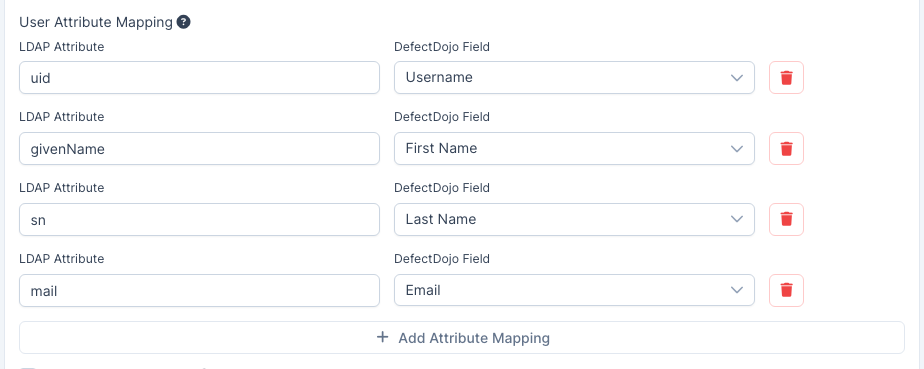
- LDAP Attribute is free text and must match the attribute your directory actually
returns — for example
uid,givenName,sn,mailon OpenLDAP, orsAMAccountName,givenName,sn,mailon Active Directory. - DefectDojo Field is chosen from a list: Username, First Name, Last Name and Email.
- Mapping an attribute to Email is strongly recommended: DefectDojo uses the email address for notifications.
- The same attribute may feed more than one field. Each DefectDojo field may be mapped from only one attribute.
- With no mapping at all, accounts are created without a name or email address.
Always Update User controls when the mapping is applied. When enabled (the default), the mapped attributes are refreshed from the directory on every login, so a name or email change in LDAP reaches DefectDojo. When disabled, they are only applied when the account is first created.
Group Mapping
DefectDojo can mirror a user’s LDAP groups into DefectDojo groups on login. Check Enable Group Mapping to reveal the settings.
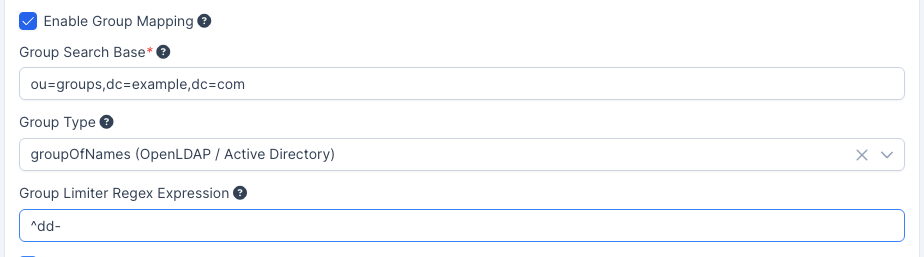
- Group Search Base — the DN to search beneath for group entries, e.g.
ou=groups,dc=example,dc=com. Required when group mapping is enabled. - Group Type — how your directory models membership. Choose groupOfNames for OpenLDAP and Active Directory, groupOfUniqueNames, or posixGroup.
- Group Limiter Regex Expression — only groups whose name matches this expression are
mirrored. Use
.*to allow all, or a prefix such as^dd-to mirror only the groups you intend DefectDojo to manage.
Groups are created on first use if they do not already exist. A newly created group has no permissions until a Superuser configures them — see User Groups.
Additional Options
- Use StartTLS — upgrade a plain
ldap://connection to TLS before binding. Not needed when the URI is alreadyldaps://. - Always Update User — refresh the mapped attributes from the directory on every login.
Troubleshooting
Run Validate Config first — it will usually name the problem directly. Beyond that:
Every login fails, but the directory is reachable. Check the User Search Filter
contains %(user)s and that the attribute in it matches what users actually type. A filter
of (uid=%(user)s) will never match if your users log in with an Active Directory
sAMAccountName.
Logins succeed but accounts have no name or email. The User Attribute Mapping is empty, or the LDAP attribute names on the left do not match what your directory returns.
A name changed in LDAP but not in DefectDojo. Always Update User is disabled, so the mapping only applied when the account was created.
Login attempts hang or are slow. Connections and searches are bounded by a timeout, so an unreachable directory fails rather than blocking indefinitely. Check Server Reachability in Validate Config and confirm the port is open from the DefectDojo host.