

Single Sign-On
Single Sign-On is a DefectDojo Pro feature. As of DefectDojo 3.0, the SSO surface — SAML, OIDC, and the bundled OAuth providers — is available only in DefectDojo Pro. Open-source DefectDojo uses local username/password login and the password-reset flow.
If you’re running open-source DefectDojo and want SSO, you’ll need to switch to DefectDojo Pro; the migration is covered in the 3.0 upgrade notes. Existing user accounts and group memberships are preserved on upgrade. For access control on open-source DefectDojo, see the Authorized Users page.
Seeing what is configured
Authorization Connectors lists every supported provider on one page — which are configured, which are enabled, and what protocol each speaks — and takes you straight to the settings form for any of them. Start there if you want to know the state of this instance rather than set up a specific provider.
Supported SSO providers (DefectDojo Pro)
DefectDojo Pro supports SAML and the following OAuth providers. Each guide walks through the provider-side setup and the corresponding configuration in the Pro Enterprise Settings UI.
Provisioning users from your directory (DefectDojo Pro)
The providers above decide who may sign in. SCIM Provisioning keeps the account list itself in step with your directory, so users are created when they join, updated when their details change, and deactivated (along with their API tokens) when they leave.
SSO configuration in DefectDojo Pro can only be performed by a Superuser.
DefectDojo Pro users: Add the IP addresses of your SAML or SSO services to the Firewall whitelist before setting up SSO. See Firewall Rules for more information.
Disabling Username / Password login
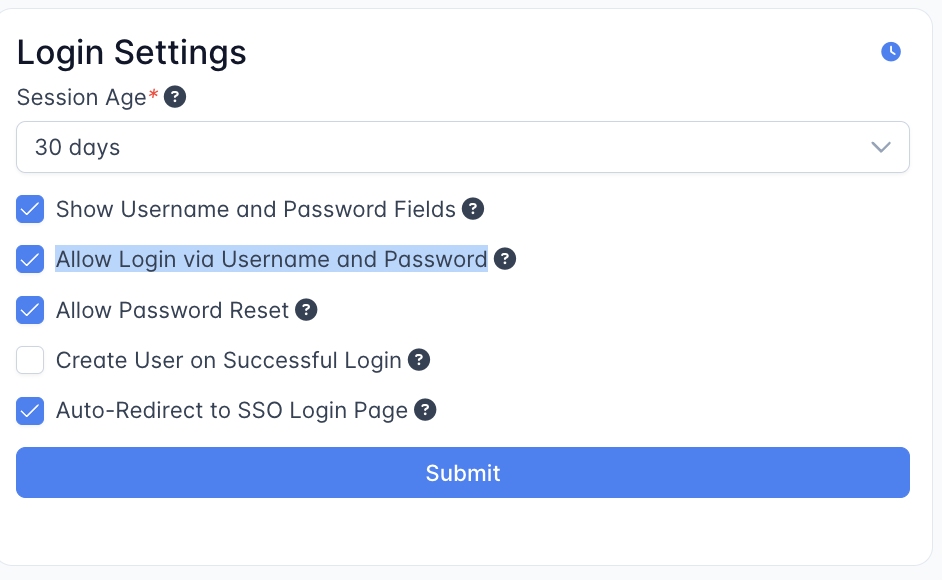
Once SSO is configured in DefectDojo Pro, you may want to disable the traditional username/password login form. Uncheck Allow Login via Username and Password under Enterprise Settings > Login Settings.
Login fallback
If your SSO integration stops working, you can always return to the standard login form by appending the following to your DefectDojo URL:
/login?force_login_form
We recommend keeping at least one admin account with a username and password configured as a fallback.
Configure Auth0 SSO in DefectDojo Pro
See every identity provider on one page: which are configured, which are enabled, and what protocol each one speaks
Configure Azure AD SSO and group mapping in DefectDojo Pro
Configure GitHub Enterprise SSO in DefectDojo Pro
Configure GitLab SSO in DefectDojo Pro
Configure Google OAuth in DefectDojo Pro
Configure KeyCloak SSO in DefectDojo Pro
Configure LDAP authentication in DefectDojo Pro
Configure OpenID Connect (OIDC) SSO in DefectDojo Pro
Configure Okta SSO in DefectDojo Pro
Configure SAML in DefectDojo Pro
Provision and deprovision DefectDojo Pro users from your identity provider